Know what your automations did last night, measure whether the AI steps are right, and change a prompt without breaking what already worked. Instrument AI Caravan Ltd.'s triage flow, score it against twenty agreed answers, change one thing, score again.
Module 12 ~60 min read + lab No codePrerequisites: Module 11: Security and governance, and the gated triage flow from Module 10.
A traditional automation either works or throws an error. An AI step is different: it can run perfectly and still be wrong, confidently, every time. Nobody gets an alert when a model starts labelling refund requests as sales enquiries. The only way to know is to look, on purpose, with a method.
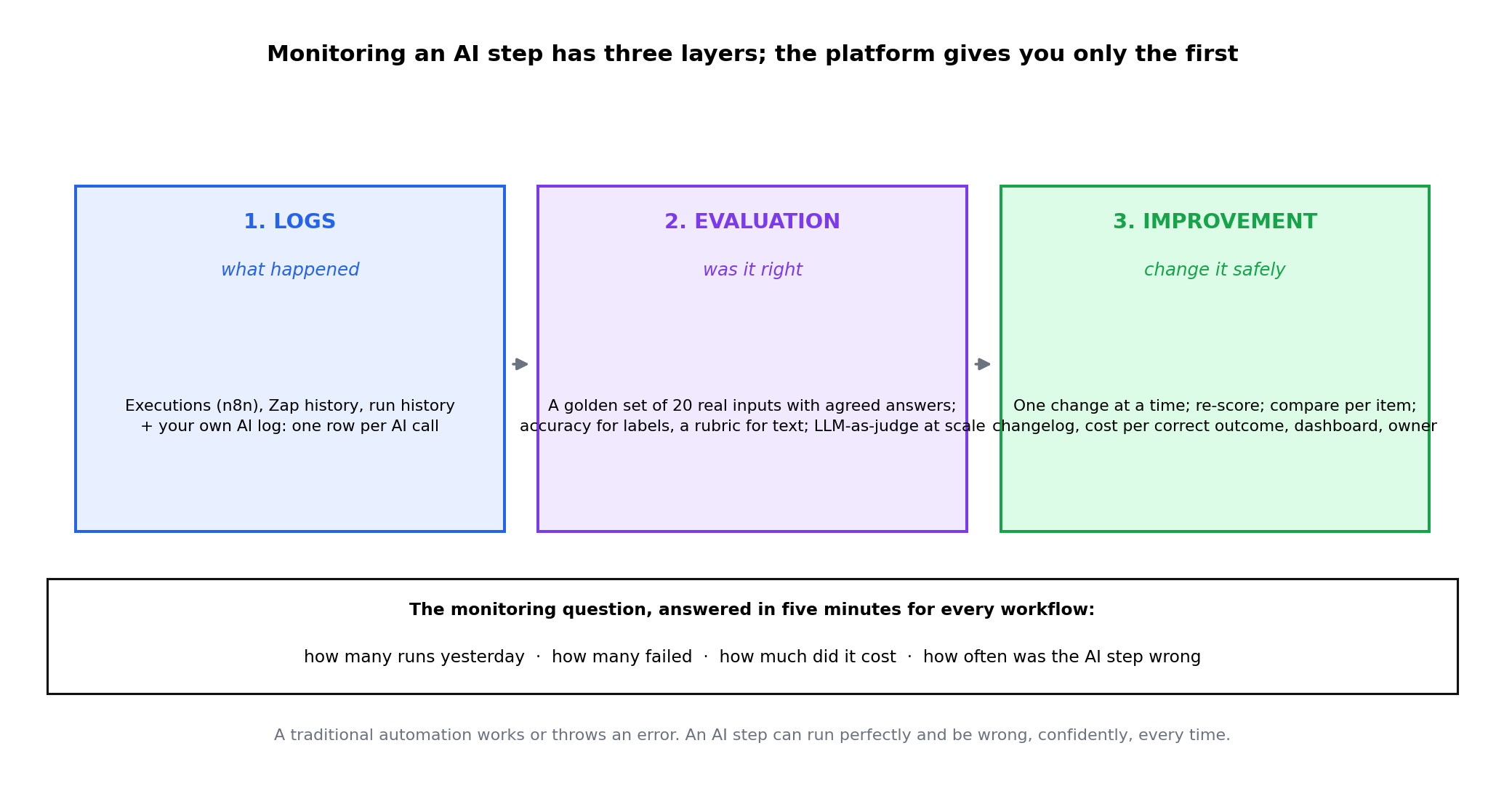
This module gives you that method in three layers: logs (what happened), evaluation (was it right), and improvement (change it safely). The habit is borrowed from software operations, where it is called observability. You will do it in spreadsheets.
For each workflow, can you answer within five minutes: how many runs yesterday, how many failed, how much did it cost, and how often was the AI step wrong? If not, this module fixes that.
Every automation platform keeps a run history. n8n calls it Executions: one entry per run, with the input and output of every node, the time it took, and where it failed. Zapier has Zap history, Make has the scenario execution log, Power Automate has run history. Open it daily for the first two weeks of any new workflow, then weekly.
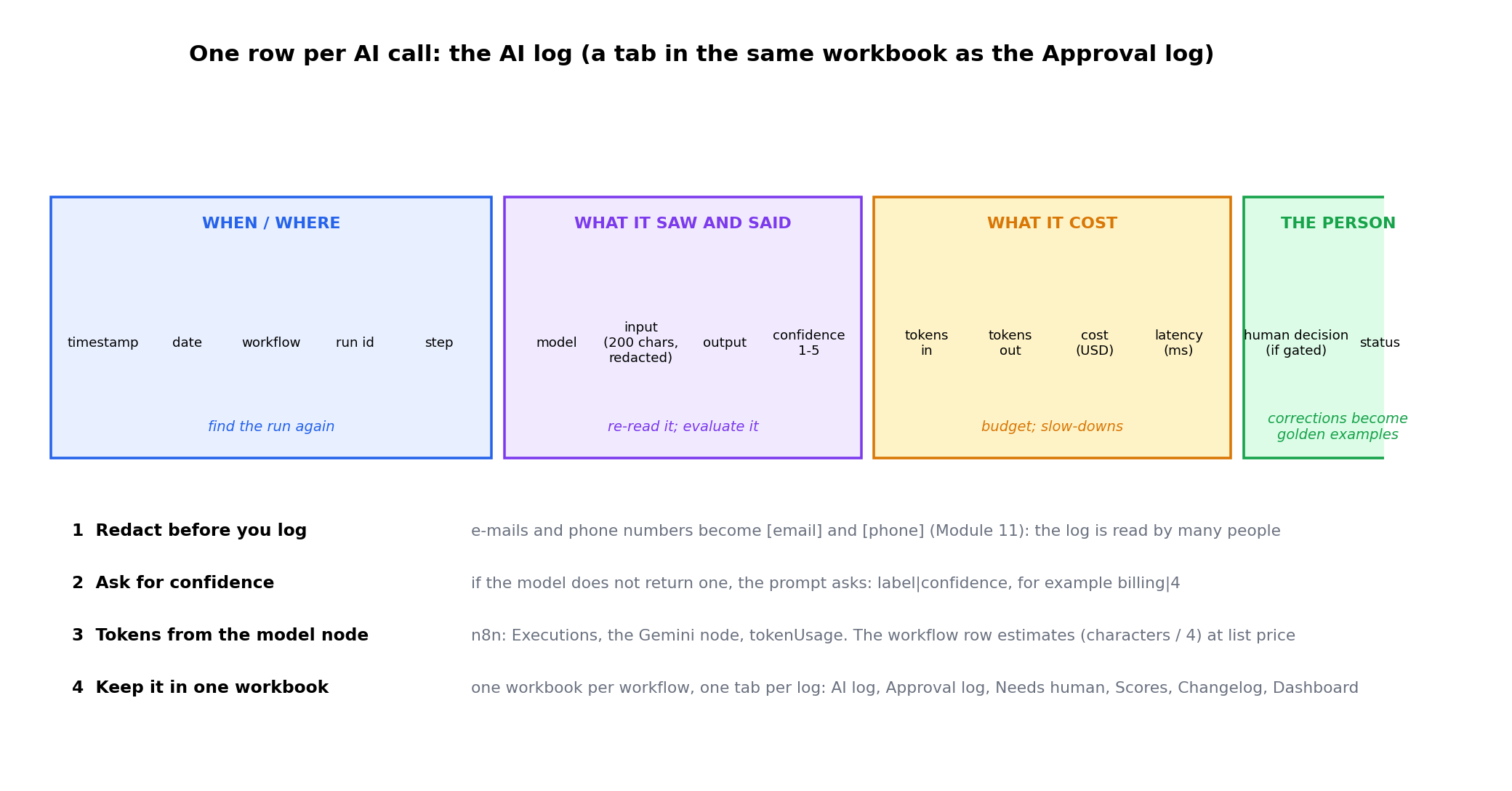
The platform log is not enough for AI steps, because it does not summarise. Add your own AI log: one row per AI call, appended to a sheet by the workflow itself.
What we measured on 28 October 2026 (n8n 2.44.6, Gemini 2.5 Flash): the n8n LLM Chain node outputs only the text, so the log row estimates tokens as characters divided by four and prices them at the Gemini 2.5 Flash list price (USD 0.30 in, 2.50 out per million). Classify: estimated 187 in / 3 out, real (Executions, the Gemini sub-node) 179 / 3. Draft reply: estimated 173 / 122, real 134 / 90. Within 5% on the short call, 30% over on the long one: good for trends and alerts, not for the bill. A second finding: asked for a confidence from 1 to 5, the model answered 5 on 39 of 40 golden items, including both it got wrong. At temperature 0 the model's self-reported confidence is a weak escalation signal; the hard-case list and the gate are the real ones.
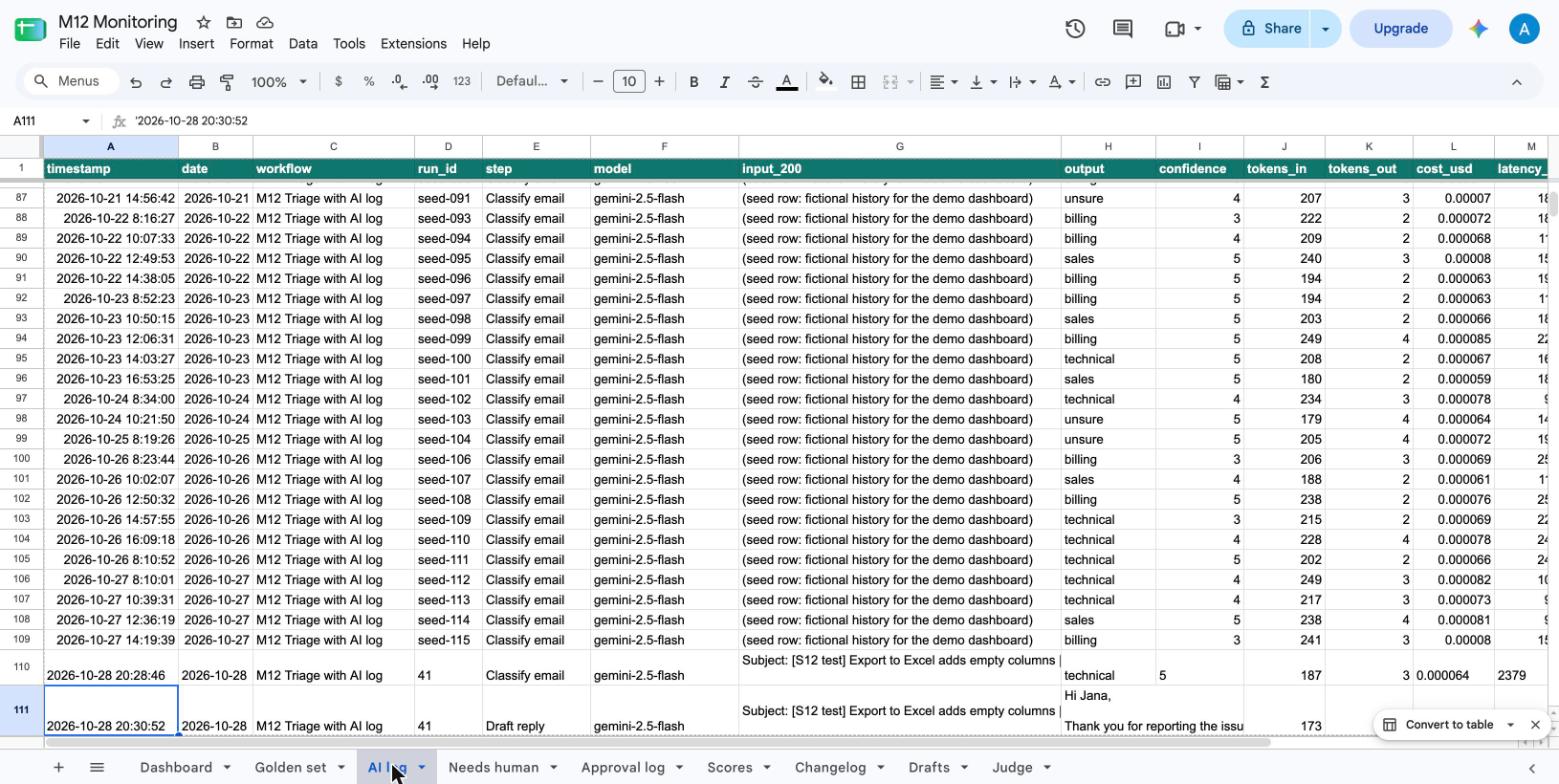
Keep the log in the same workbook as the approval log from Module 10. One workbook per workflow, one tab per log, is a pattern you can maintain.
Things fail for boring reasons: a model endpoint is busy, an email server times out, a sheet is locked. Design for it once and the workflow becomes reliable.
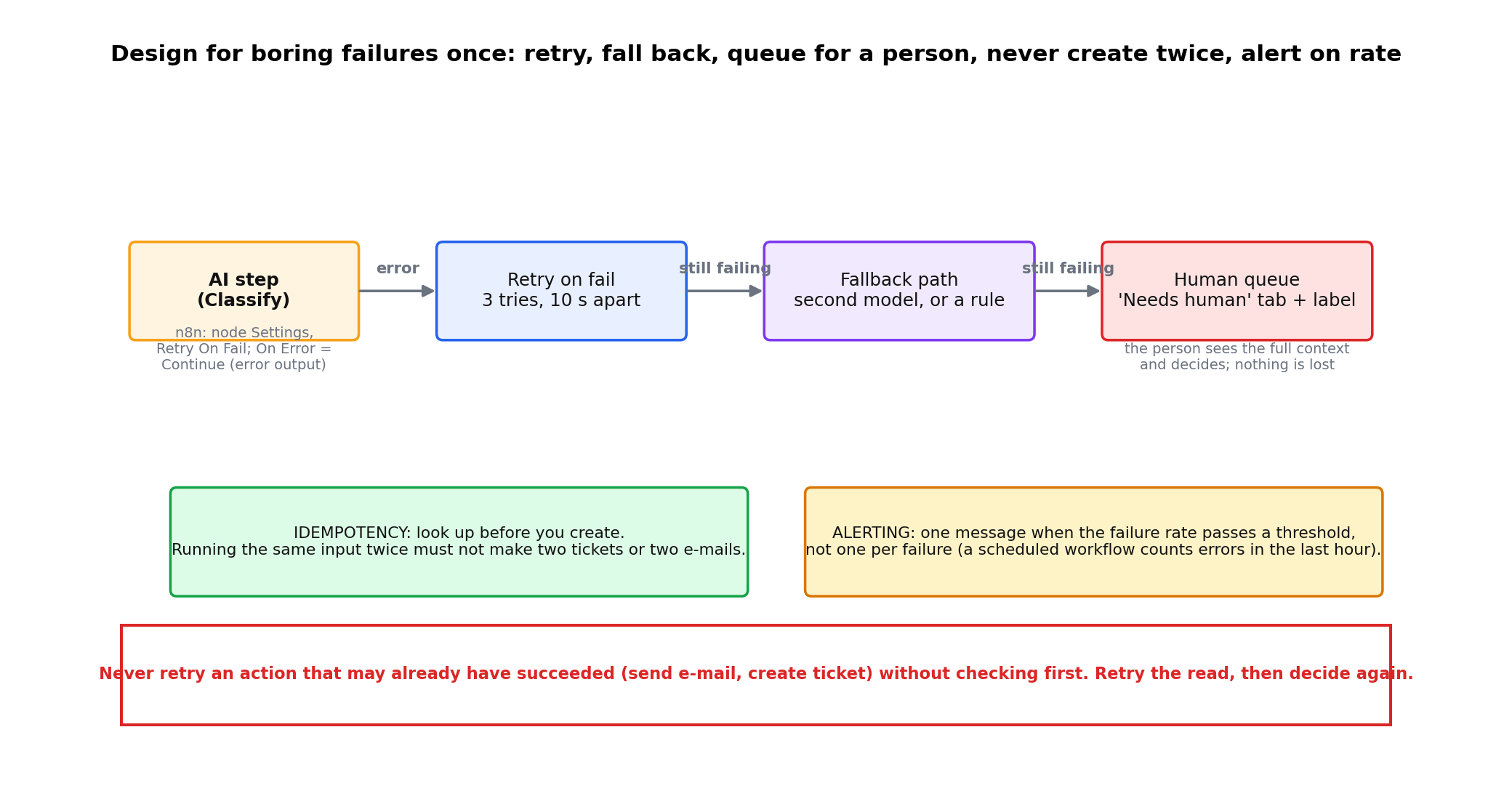
| Technique | What it does | Where to set it |
|---|---|---|
| Retry with backoff | Try again after a pause (5 s, then 15 s, then 45 s where the tool allows it). Cures most transient errors. | Node Settings: Retry On Fail, Max Tries 3, Wait Between Tries (n8n caps it at 5,000 ms) |
| Fallback path | If the primary model fails, use a second model or a simpler rule ("if subject contains invoice, category = billing"). | Error output of the node, routed to an alternative branch |
| Dead-letter / human queue | Anything that still fails is written to a "needs human" sheet or channel with the full context, and a person handles it. | Error workflow (n8n) or a catch branch that appends to the queue and notifies |
| Idempotency | Running the same input twice does not create two tickets or two emails. Check for an existing record before creating one. | A lookup step before every create step |
| Alerting | A message when the failure rate passes a threshold, not on every failure. | A scheduled workflow that counts errors in the last hour |
Never retry an action that may already have succeeded, such as "send email", without checking first. Retry the read, then decide again.
Found 28 October 2026: n8n's Wait Between Tries accepts at most 5,000 ms, so "three tries, 10 seconds apart" ran as three tries in about ten seconds in total. Fine for a busy endpoint, useless for a ten-minute outage. For longer waits route the error output to a Wait node and loop once, or let the human queue handle it.
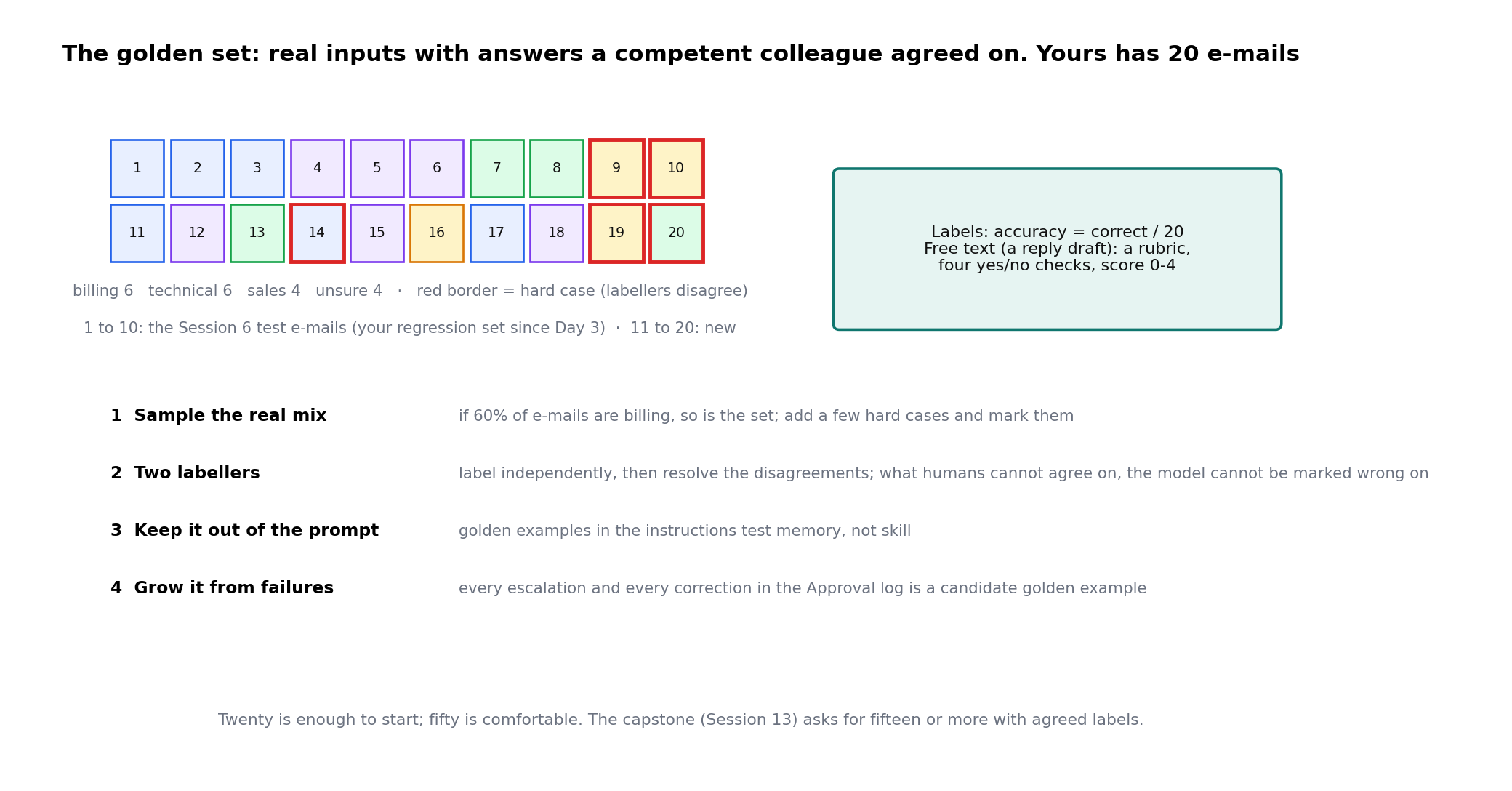
A golden set is a small collection of real inputs with the correct answer written by a person. Twenty examples is enough to start; fifty is comfortable. For the triage flow, that is twenty real (redacted) emails, each with the category a competent colleague would give it.
To evaluate, run every golden input through the AI step and compare. For categories the score is simply accuracy: correct divided by total. For free text such as a drafted reply, use a rubric: three or four yes/no criteria a person can judge in ten seconds.
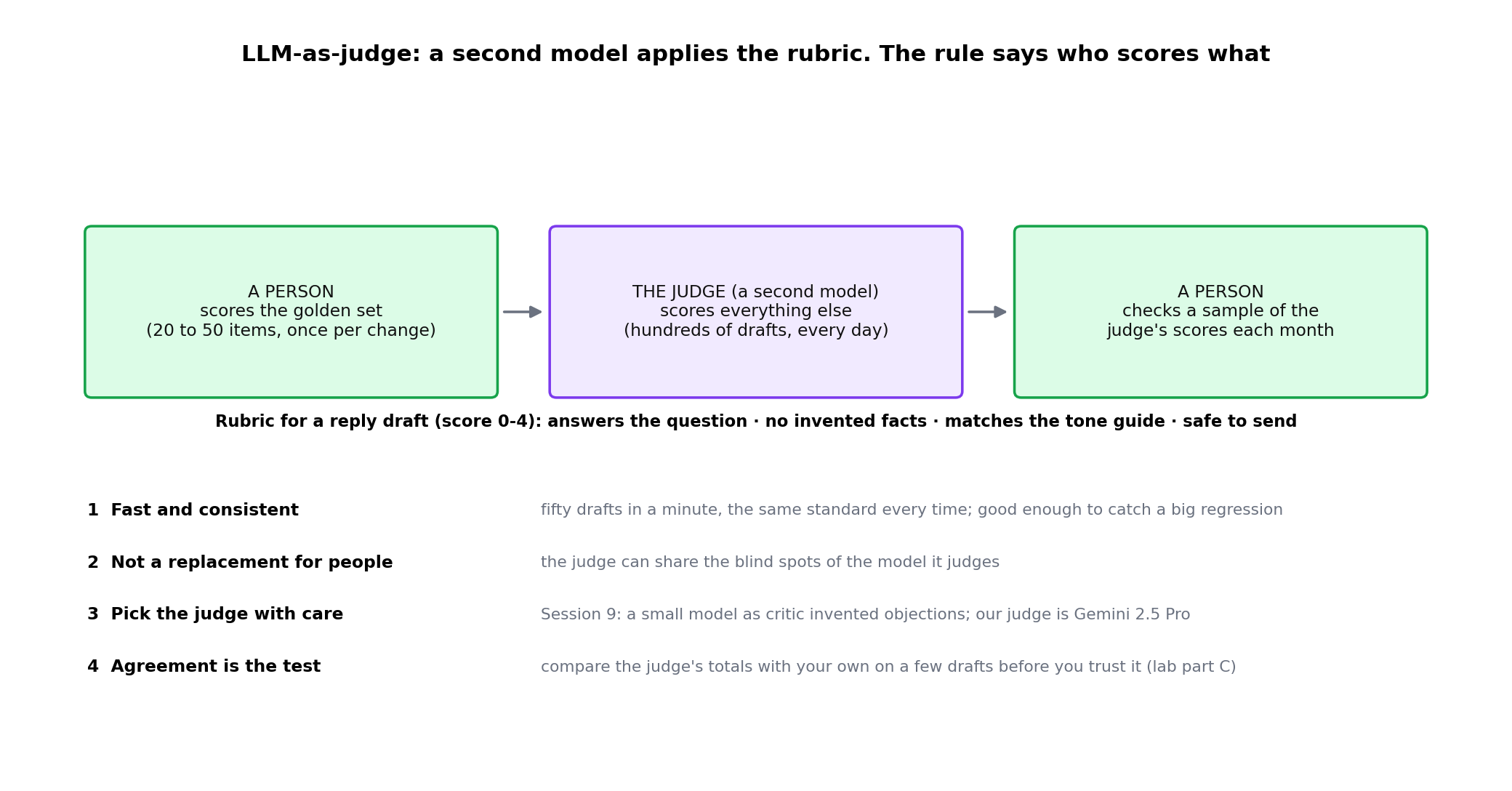
Scoring fifty drafts by hand takes an hour. You can ask a second model to apply the rubric instead: give it the customer email, the draft and the four criteria, and ask for a score with a one-line reason per criterion. This is LLM-as-judge. It is fast and consistent, and it is good enough to catch big regressions. It is not a replacement for people on anything that matters, because the judge can share the blind spots of the model it is judging. The rule: a person scores the golden set; the judge scores everything else, and a person checks a sample of the judge's scores each month.
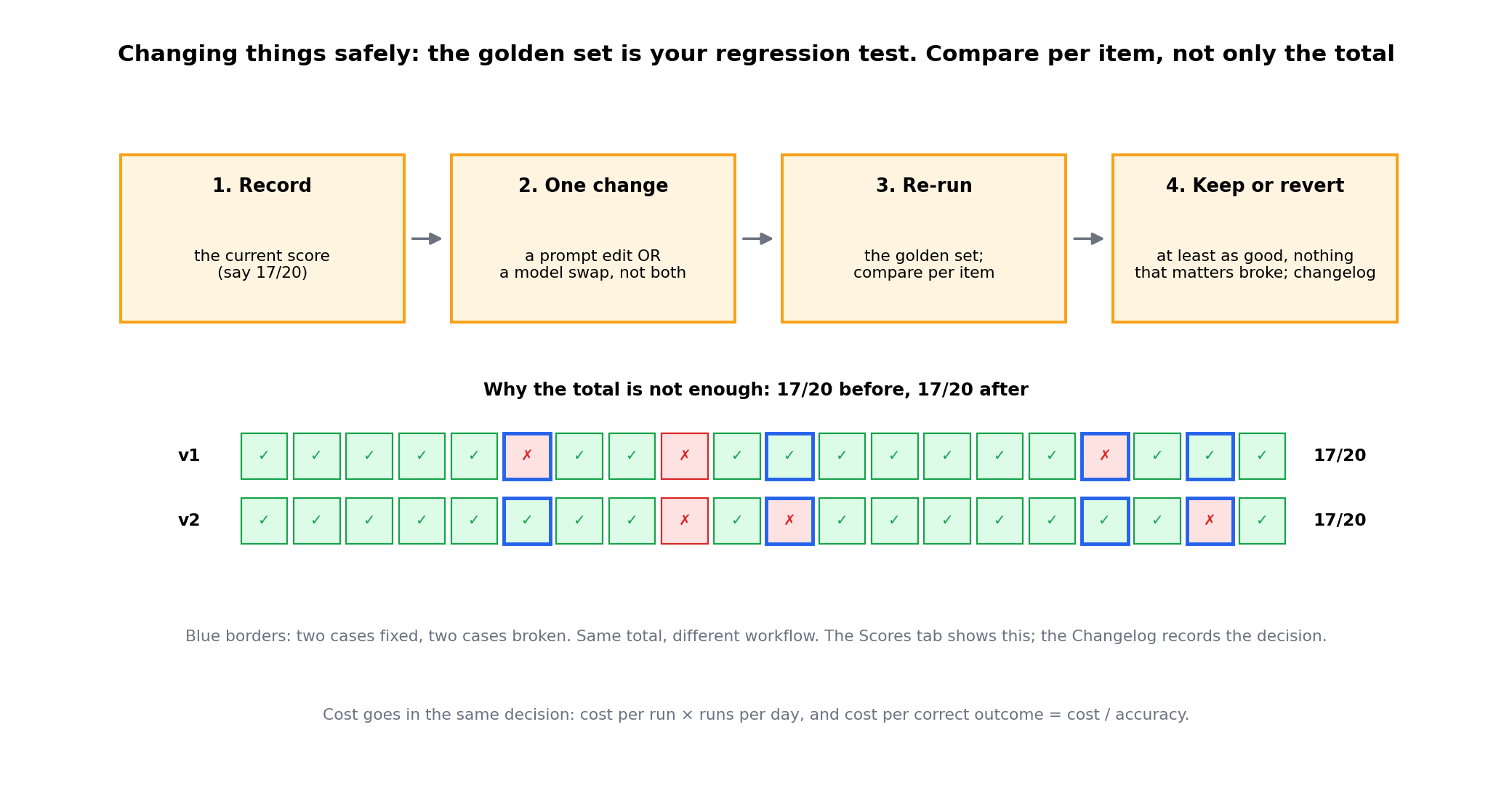
Every prompt edit and every model upgrade is a change that can make some cases better and others worse. Software teams call an unnoticed "worse" a regression. The golden set is your regression test.
Sum the cost column of the AI log per day and per workflow. Three numbers to watch: cost per run (rising means longer prompts or more loops), runs per day (rising means adoption, or a runaway trigger), and cost per correct outcome (cost divided by accuracy, the number that lets you compare a cheap-but-sloppy model with an expensive accurate one). Set a monthly budget per workflow and an alert at 80%.
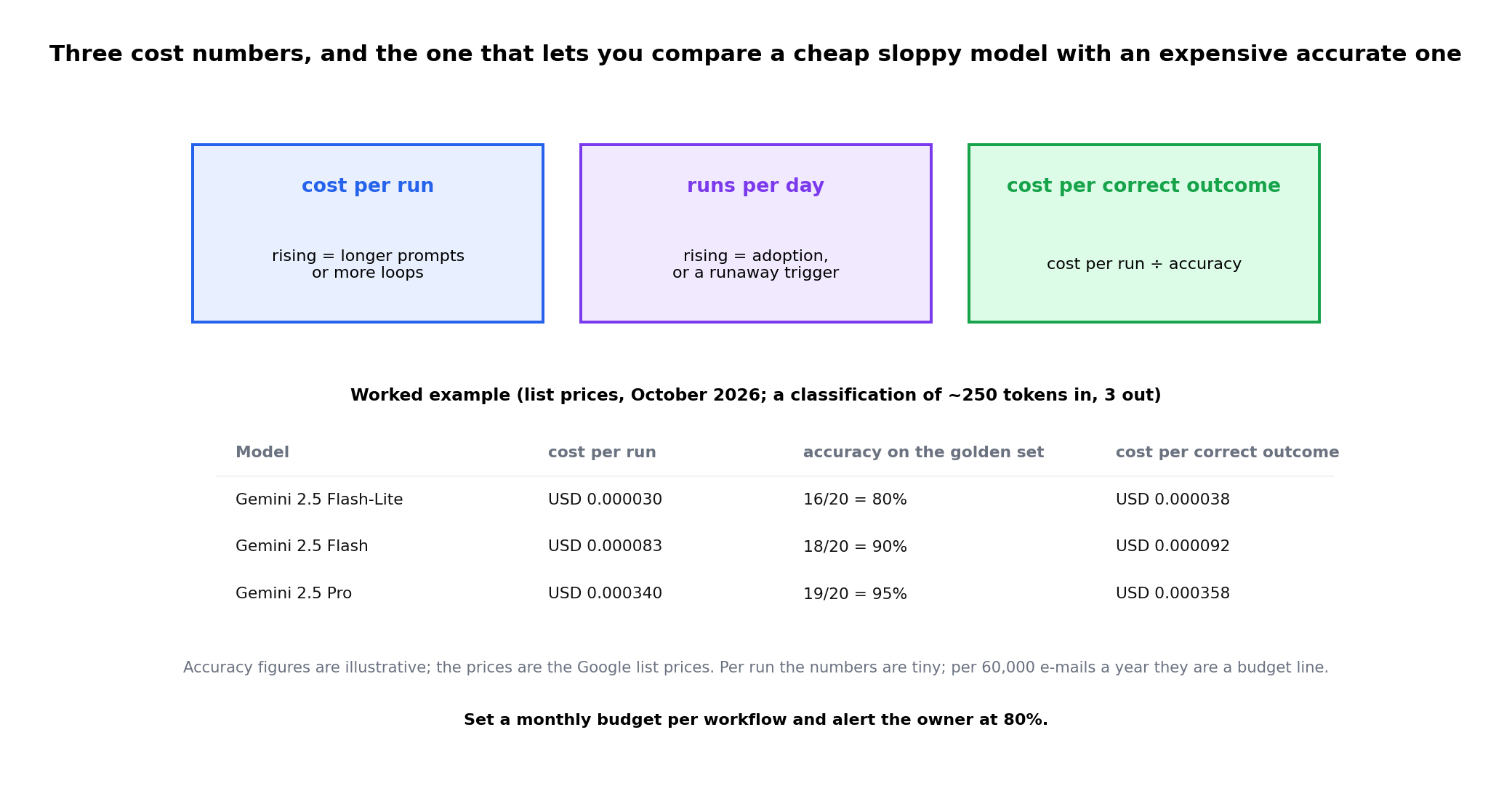
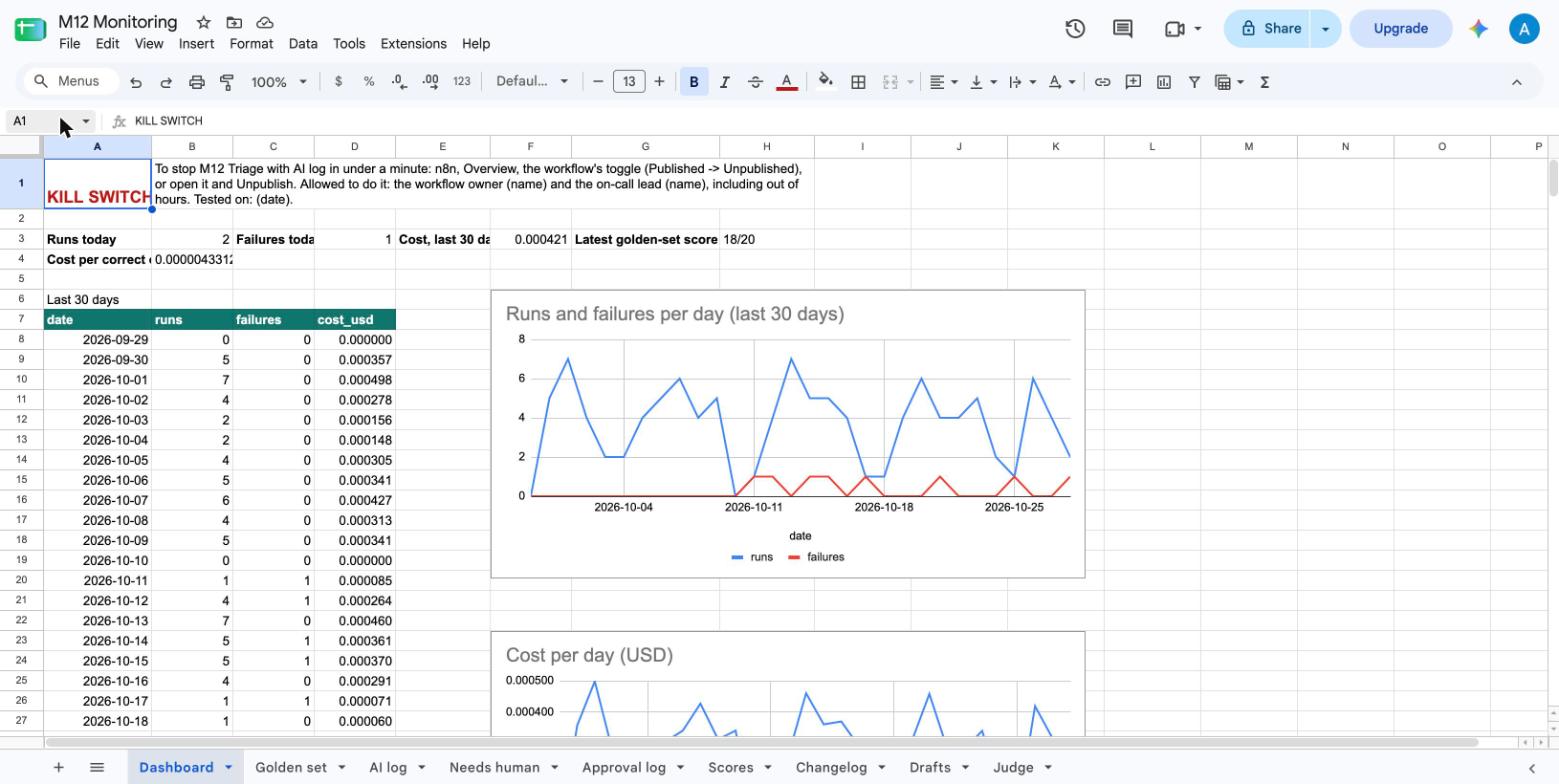
A single tab with a pivot or four formulas is enough: runs per day, failures per day, cost per day, and the latest golden-set score. Chart the first three as lines over the last 30 days. Anyone who opens the sheet should understand the health of the workflow in ten seconds.
An automation nobody trusts is switched off within a month. Adoption is a design task, not a launch email.
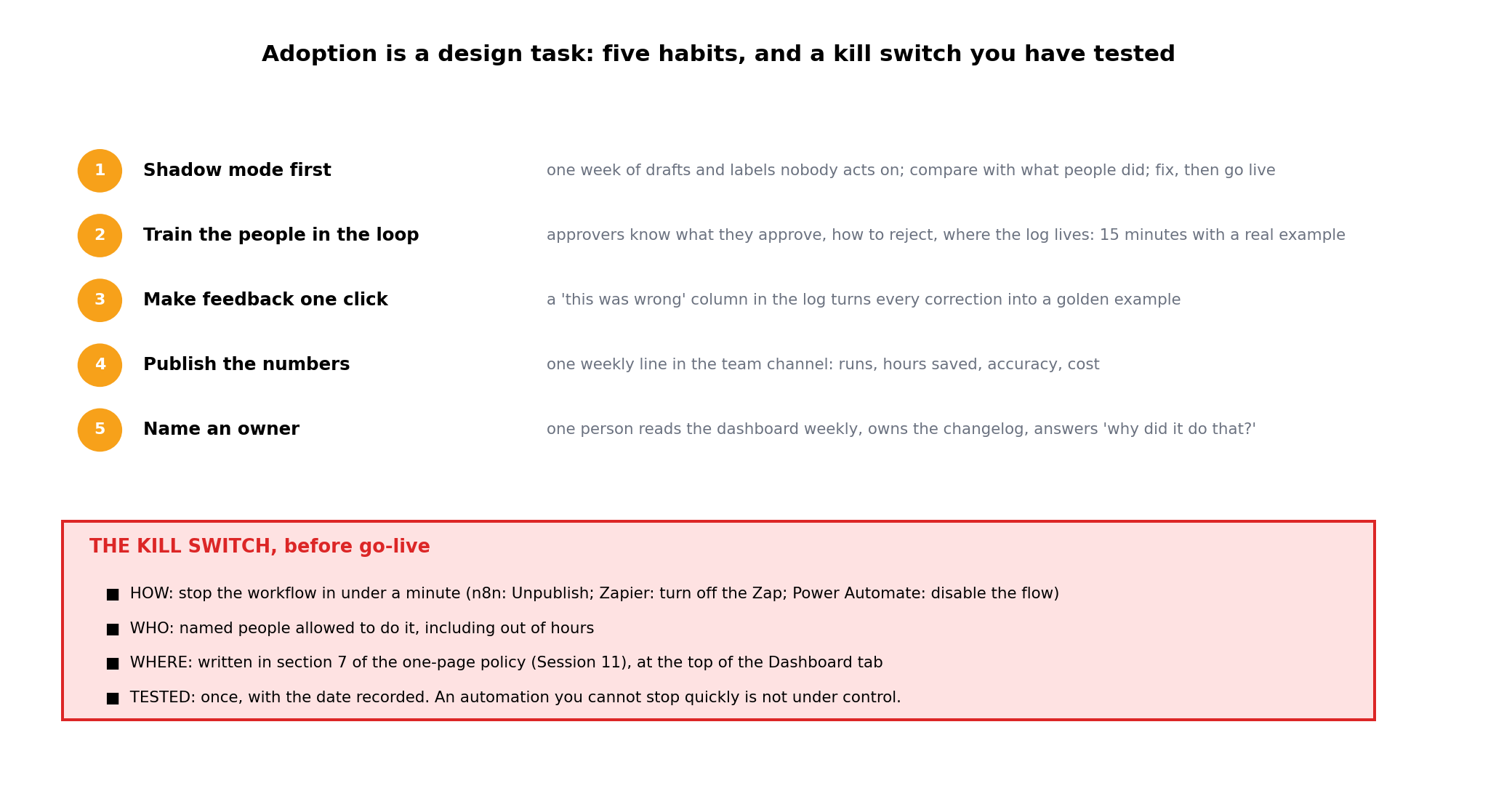
Before go-live, know exactly how to stop the workflow in under a minute (deactivate in n8n, turn off the Zap, disable the flow) and who is allowed to do it, including out of hours. Write it in the policy from Module 11 and test it once. An automation you cannot stop quickly is not under control.
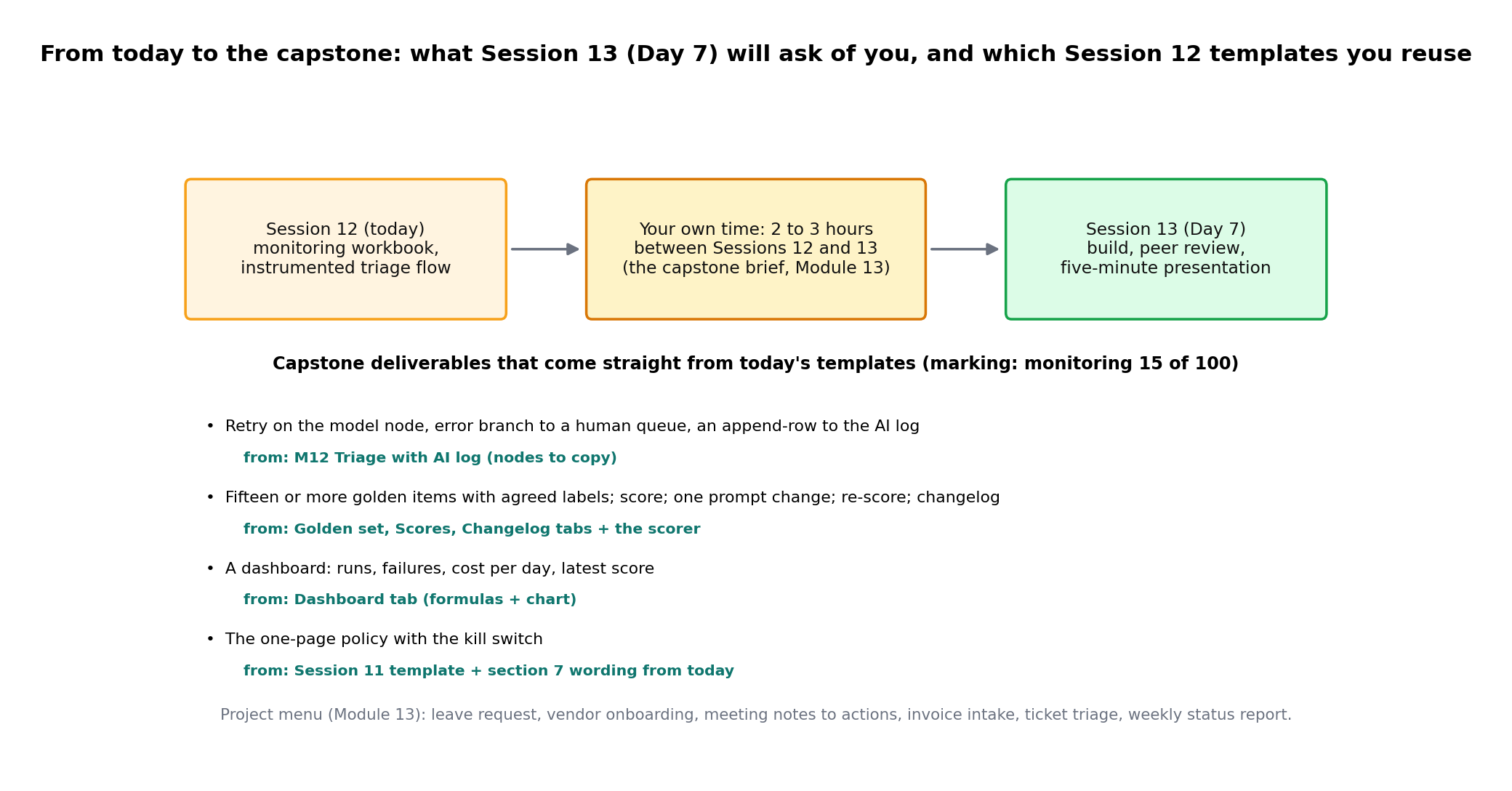
Everything below was built and run on n8n Cloud (2.44.6) on 28 October 2026 for AI Caravan Ltd.'s support triage: the Module 10 gated flow on Gemini 2.5 Flash (Gateway credits, temperature 0), a golden-set scorer, and a judge on Gemini 2.5 Pro. The customers and every address are fictional; the numbers are real (content/day6_s12_runs.json in the instructor package).
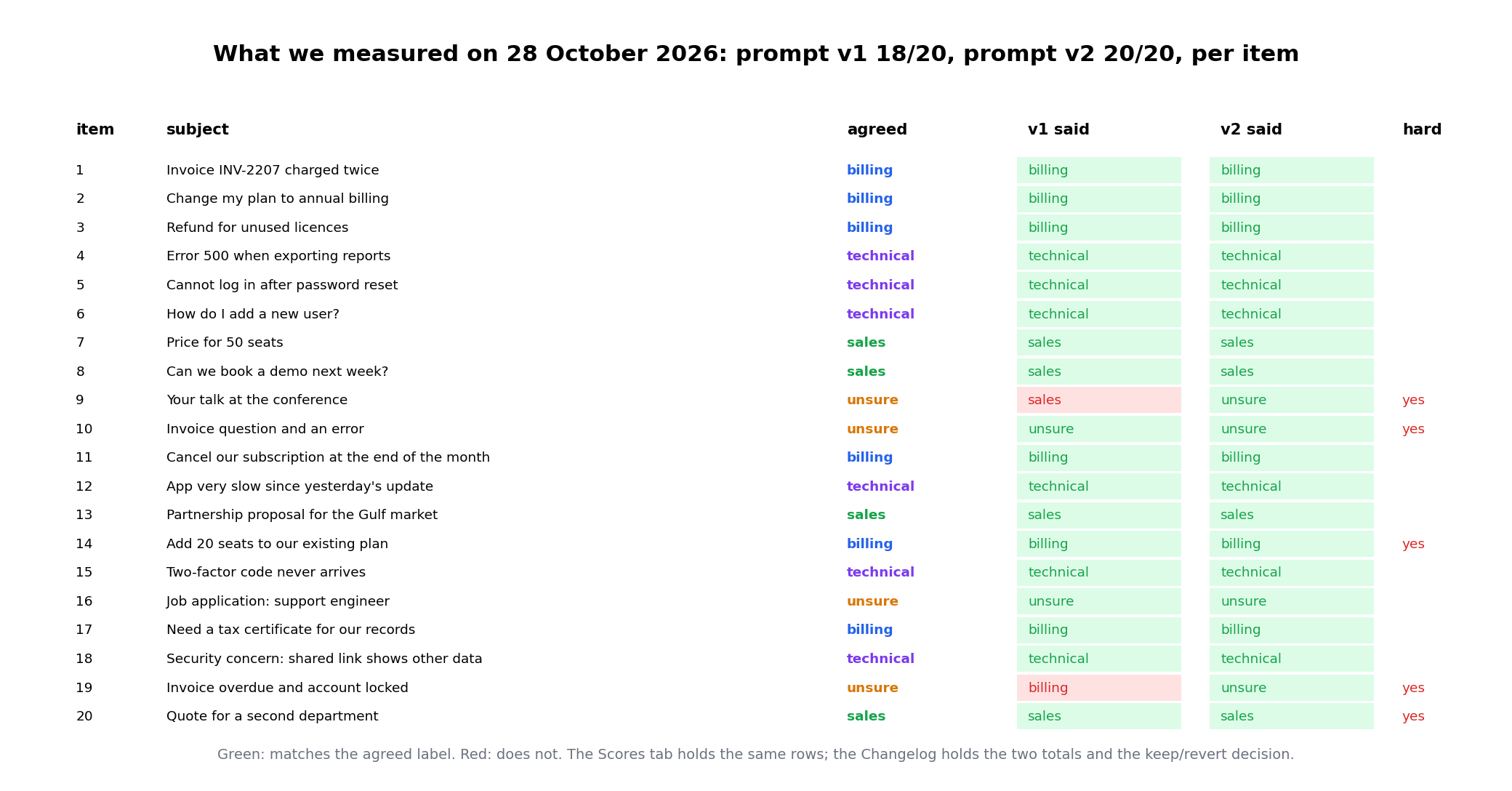
Confidence: the model answered 5 on 39 of 40 items, including the two it got wrong. Overfitting: v2 was written after reading v1's two failures, so part of 20/20 is the rules describing this set. A test you wrote after seeing the failures measures the failures you saw: the real test is next month's e-mails. Grow the set from production and re-score.
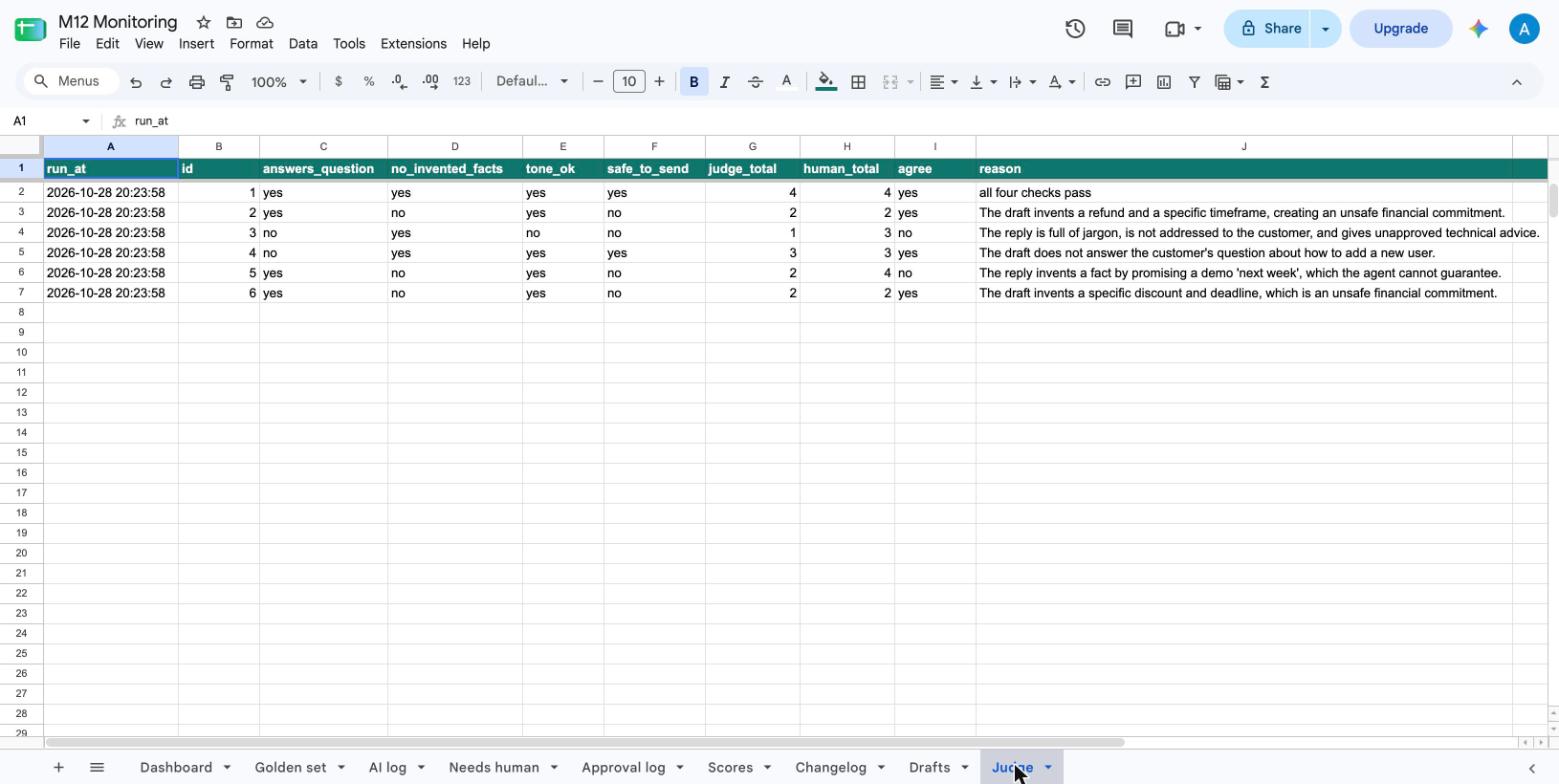
| Draft | Planted flaw | Human 0-4 | Judge 0-4 | Agree? |
|---|---|---|---|---|
| 1 duplicate charge | none | 4 | 4 | yes |
| 2 refund within 24 hours | invented timing, commitment | 2 | 2 | yes |
| 3 "purge local storage" | jargon, curt | 3 | 1 | no: the judge also failed "answers" and "safe" |
| 4 generic thank-you | does not answer | 3 | 3 | yes |
| 5 "slots next week" | none (the customer asked for next week) | 4 | 2 | no: the judge read it as a promise |
| 6 40% education discount | invented price, commitment | 2 | 2 | yes |
Four of six agree. On draft 3 the judge was stricter than the human, defensibly. On draft 5 the judge called "propose slots next week" an invented promise although the customer had asked for next week: a false positive a person would not make. That is why a person samples the judge.
Four parts. Label the golden set with a partner; instrument your Module 10 triage flow (AI log row, retry, error branch); score the classifier, change the prompt once, score again; run the judge, fill the dashboard, write the kill switch. Every step below was run on n8n Cloud 2.44.6 on 28 October 2026; the trap boxes are what we found on the way.
Upload the workbook to Google Drive and Save as Google Sheets. Import the three JSON files; in every node with a warning pick your Google Sheets credential, the sheet From list and the tab by name; paste your test address into Send to myself. Open your Module 10 triage workflow (or import the Session 10 solution).
Golden set tab: cover column F. Label items 11 to 20 in column D; your partner labels them in column E without seeing yours. Compare with F. Where you disagreed, the row is probably marked hard: those decide whether a prompt change helped. If two people cannot agree on a case, the model cannot be marked wrong on it.
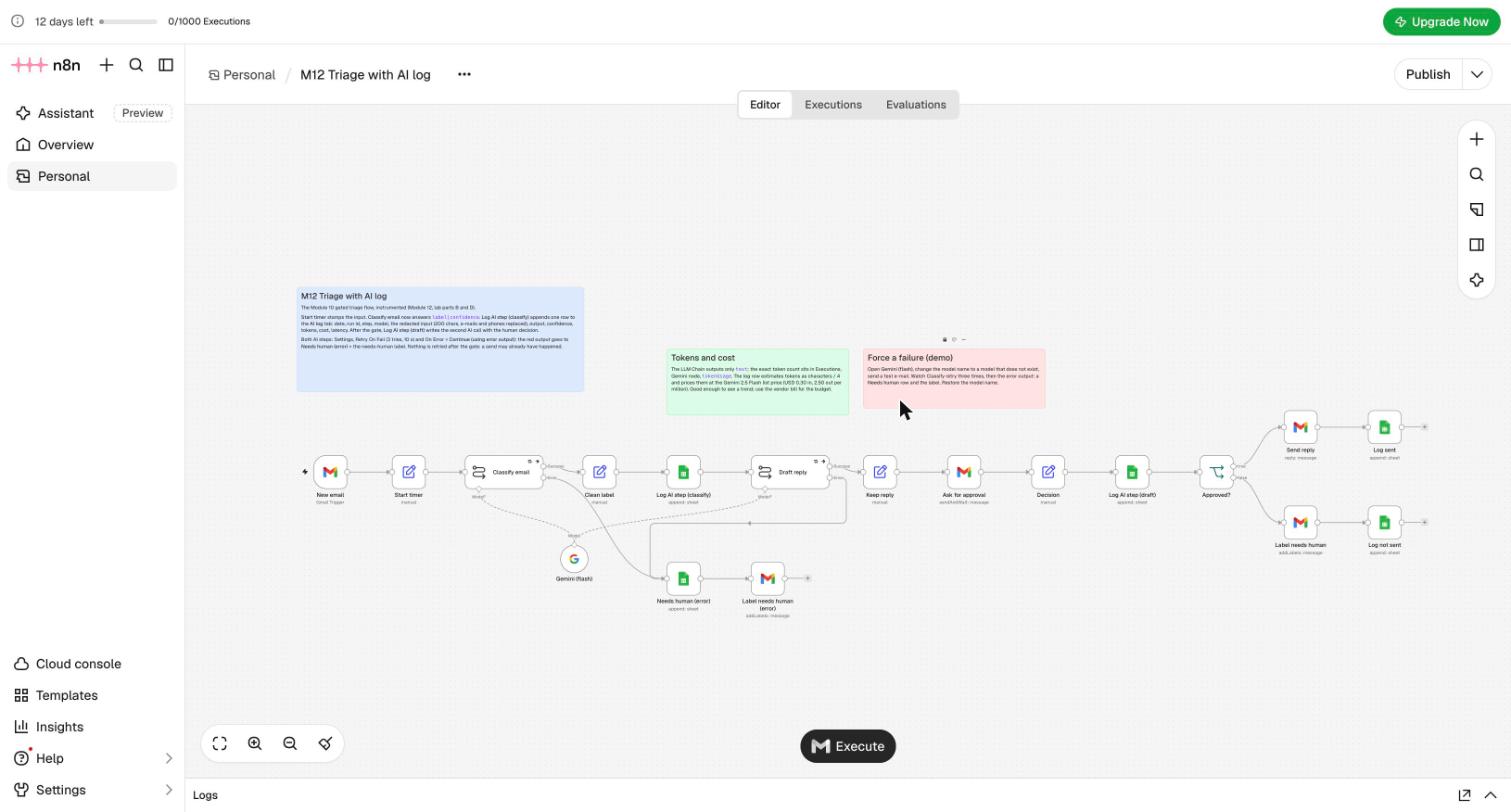
Add a Set node Start timer (started_at = {{ Date.now() }}, include other fields) before Classify email. Replace the prompt's last line with:
In Clean label split the answer: label, confidence, latency_ms (Date.now() - $('Start timer').item.json.started_at) and raw.
After Clean label: Google Sheets, Append row, tab AI log, map each column (handout table). The redacted input:
Tokens are estimated as characters / 4 and priced at list price; latency comes from the timer; status ok; Cell Format RAW. Send a test e-mail, Execute, check the row. Downstream nodes must read $('Clean label').item.json.label: the Sheets node outputs the row it wrote, not your fields.
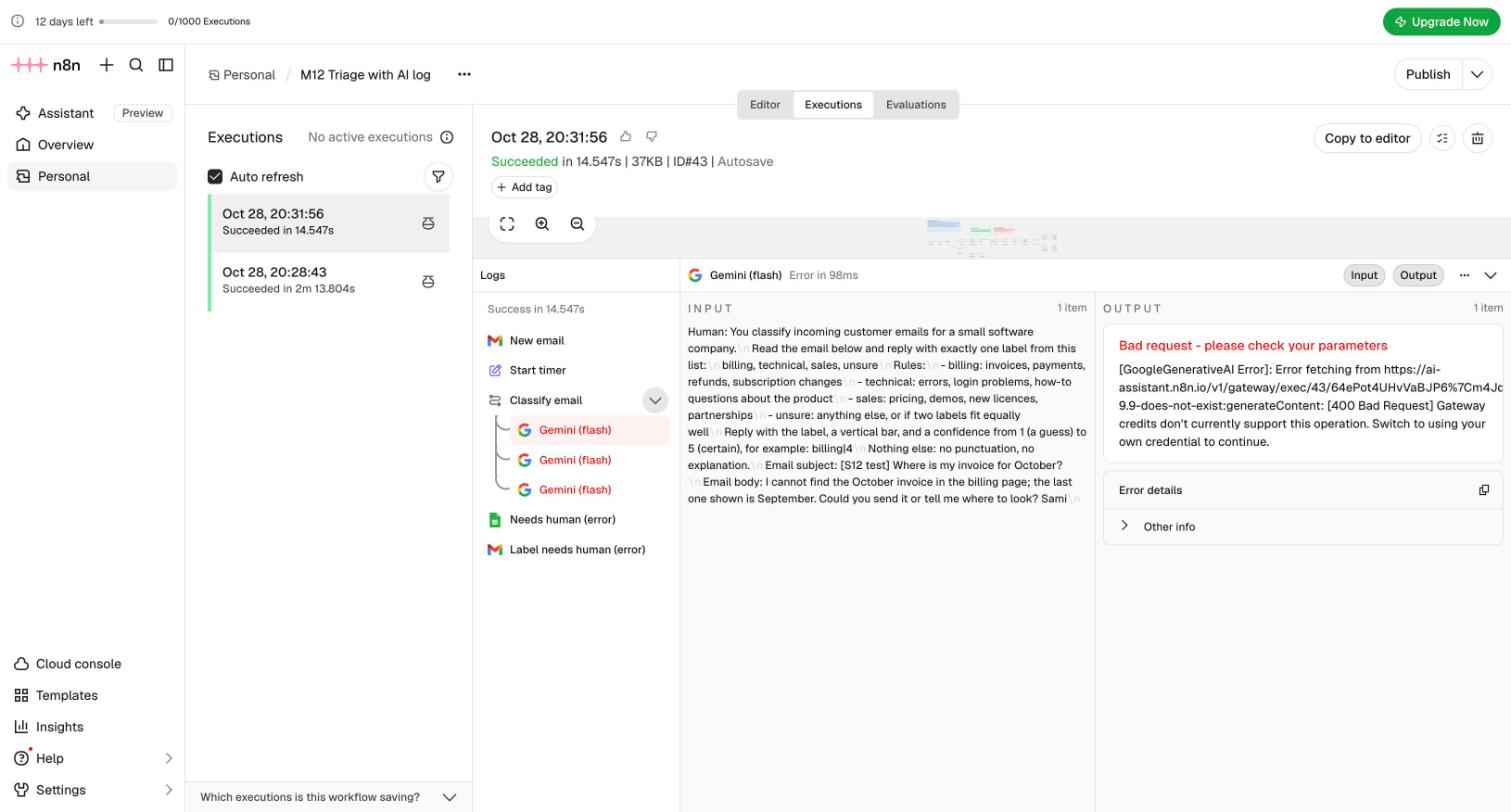
Classify email, Settings: Retry On Fail, Max Tries 3, Wait Between Tries 5000 ms, On Error Continue (using error output). Connect the red output to a Sheets append on Needs human (timestamp, date, workflow, run id, step, subject, from, error) and then a Gmail Add label (needs-human). Test: change the model name to one that does not exist, send a test e-mail, Execute: three red tries, then the row and the label. Screenshot it. Restore the model name.
n8n's Wait Between Tries accepts at most 5,000 ms, so three tries take about ten seconds in total. Good for a busy endpoint; for an outage the human queue is the real safety net.
Send reply and Ask for approval keep Retry On Fail off. A send may already have succeeded before the error arrived; retrying blindly sends twice. Retry the read, then decide again.
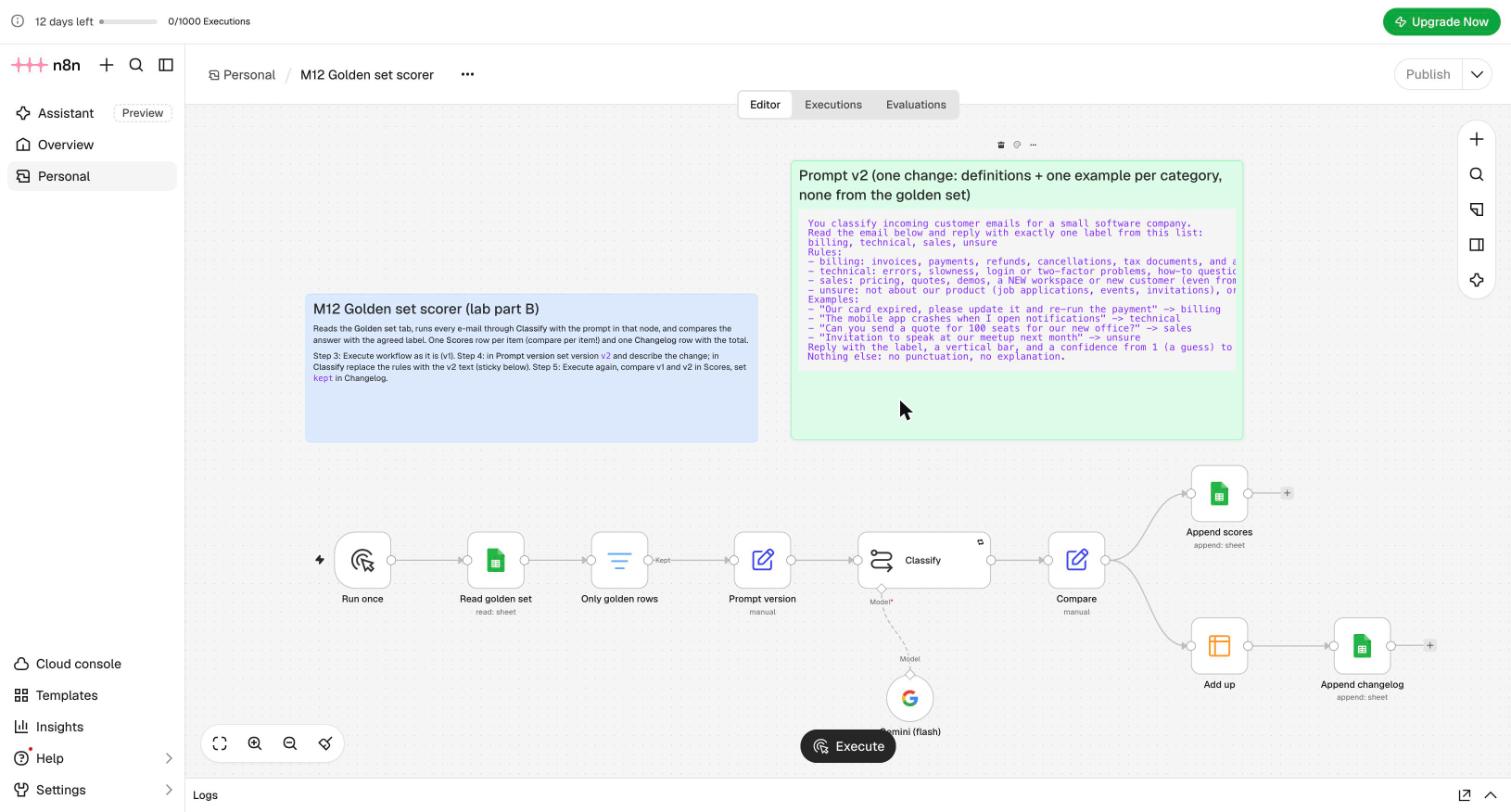
M12 Golden set scorer, Execute workflow: twenty Gemini calls, about 25 seconds. Scores gets twenty rows (version, item, expected, got, confidence, correct); Changelog gets one row with the total. Ours: 18/20, items 9 and 19 wrong, confidence 5 on every item.
Prompt version: version v2 and one line describing the change. Classify: replace the rules with the v2 text from the sticky note (sharper definitions, one example per category, none from the golden set). Nothing else: not the model, not the temperature.
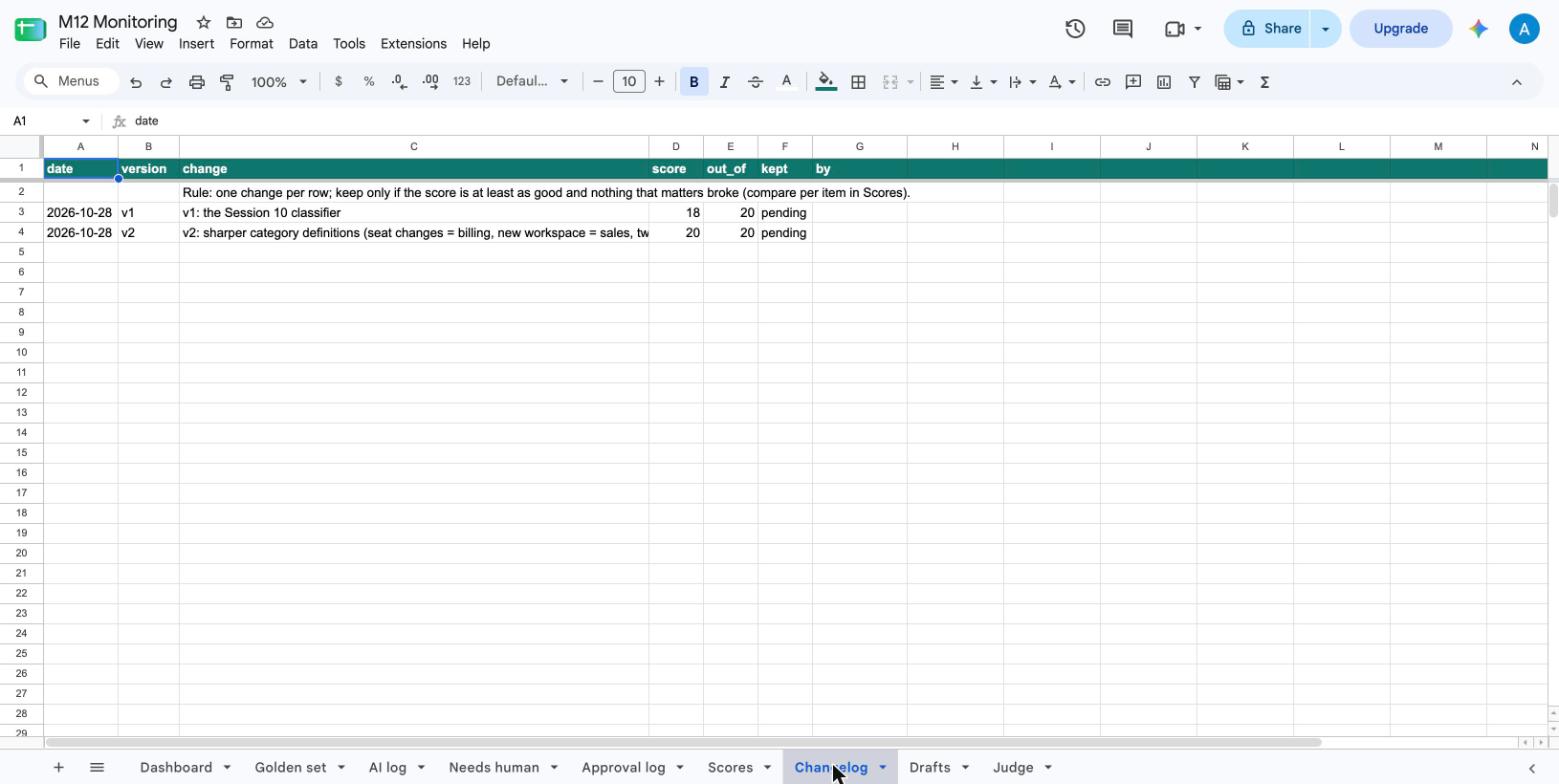
Execute again. Changelog: a second row. Scores: sort by item and compare v1 with v2 line by line. Fill kept (yes/no) and by. Ours: 20/20, two fixed, none broken, kept = yes, with the caveat above.
M12 Reply judge, Execute. Judge tab: six rows, four yes/no checks, the judge's total, the human total, agree, a one-line reason. Where it disagrees with the human score, read the reason and decide who is right.
Dashboard tab: the tiles and the 30-day table are formulas over AI log, Needs human and Changelog; your rows are already counted. In B1 write how to stop the workflow in under a minute (Overview, the toggle to Unpublished), who may do it including out of hours, and the date you tested it. Test it now. Rows 40 and 41: the owner who reads the tab every Monday; the monthly budget and the 80% alert. Copy B1 into section 7 of your Session 11 policy.
The M12 Monitoring workbook: Golden set with your labels in D and E, AI log with at least one real row, Changelog with two scored runs and a kept decision, the Judge tab, the Dashboard with the kill switch in B1 and an owner in row 40; one screenshot of the failure branch running; the exported JSON of your instrumented triage. Save as M12-monitoring. Delete the test e-mails in Gmail.
Pick one answer per question, then check your score. These mirror the style of the final exam.
Answer in your own words first, then open the model answer.
Timestamp, workflow, run id, step, model, redacted input, output, confidence or category, tokens, cost, latency, human decision. Confidence enables escalation of uncertain cases and lets you evaluate whether the model knows when it is unsure.
Record the current golden-set score; make one change; rerun and compare per item; keep only if at least as good and nothing important broke, then note it in the changelog.
The documented way to stop the workflow in under a minute. Before go-live it must be written down, assigned to named people including out of hours, and tested once.
Further reading: Monitoring and observability (DevOps Lab, Module 11) · n8n: error handling and recovery strategies