Write a prompt that returns the same shape of answer every time, keep a library of templates for your team, and set up an assistant that knows your own documents.
Module 2 of 14 · Day 1 · Session 2 · AI Administrator: Agentic Workflows & Automation
Module 02 ~45 min read + lab No code
What you will learn
Use the five parts of a working prompt: role, context, task, constraints, output format.
Ask for structured outputs (tables, checklists, labelled fields) that can be copied straight into a spreadsheet or a workflow.
Turn a good prompt into a reusable template with placeholders, and improve it with examples.
Set up a project or custom assistant with uploaded policy documents, and test where it is reliable and where it is not.
Recognise hallucination and over-confidence, and know the three habits that catch them.
When you hand a task to a new temp, you do not say "deal with the inbox". You say who they are standing in for, what the team does, what exactly to do, what they must not do, and what the finished result should look like. A prompt is the same instruction, written for a model. Vague instruction, vague output.
The difference between a chat you enjoyed and a prompt you can put inside an automation is repeatability. In Module 6 the same prompt will run hundreds of times a day without you watching. It has to produce the same shape of answer for every input. That is the standard you are learning to write to now.
The five parts
Role (who the model is), context (what it needs to know), task (the one thing to do), constraints (limits, tone, what not to do), output format (the exact shape of the answer). Most weak prompts are missing two of these.
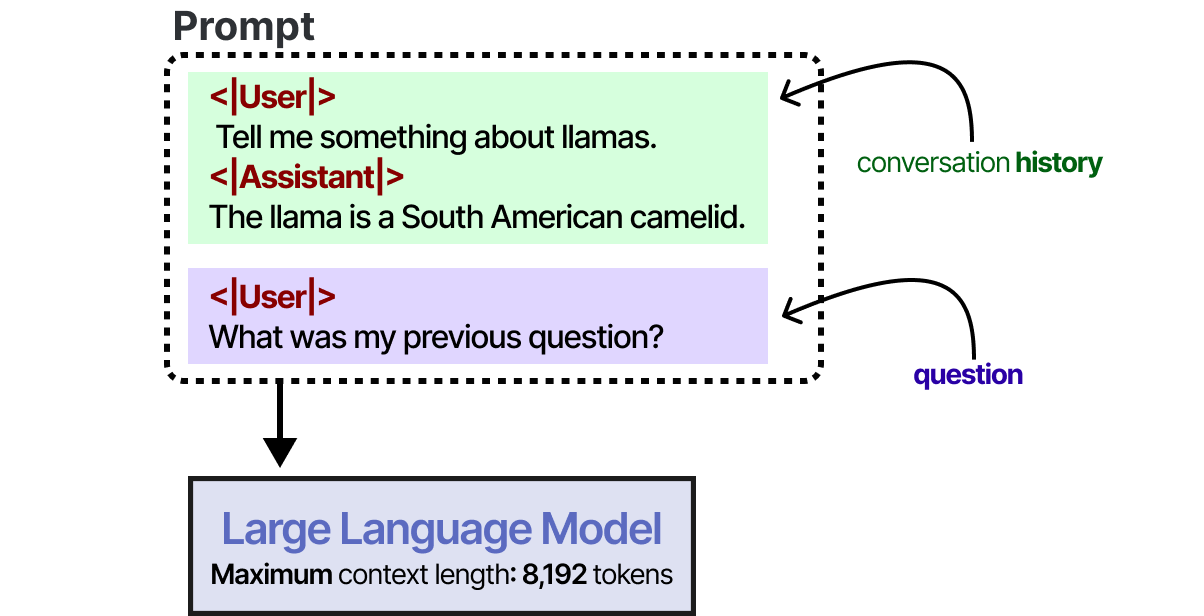
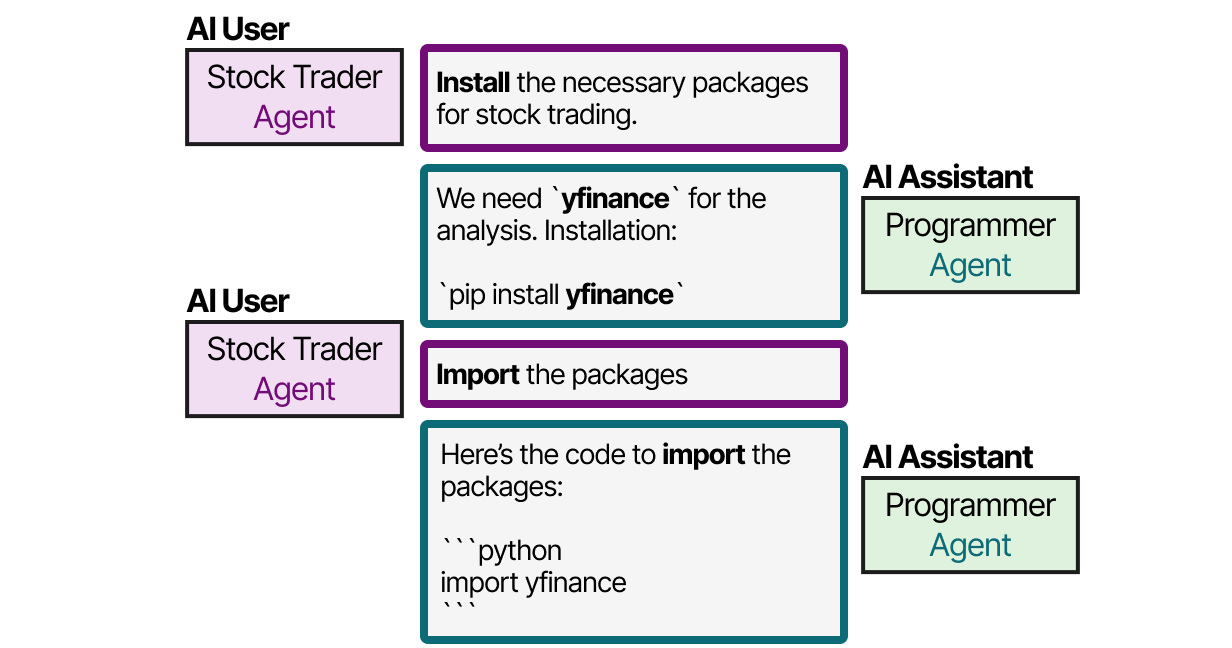
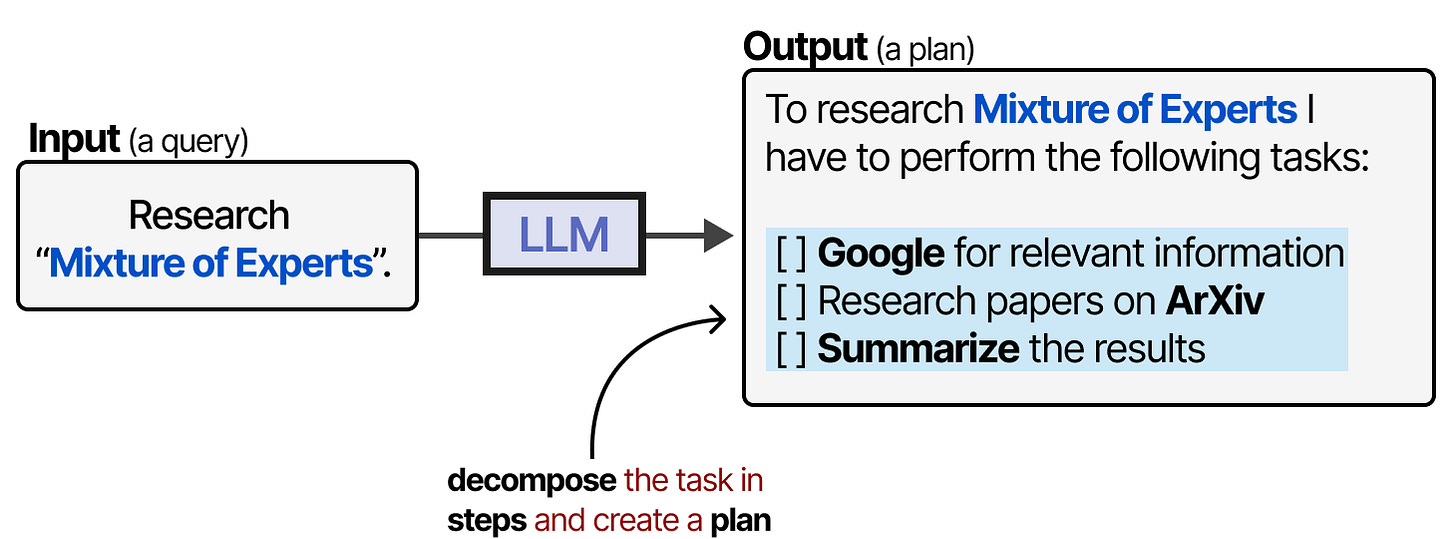
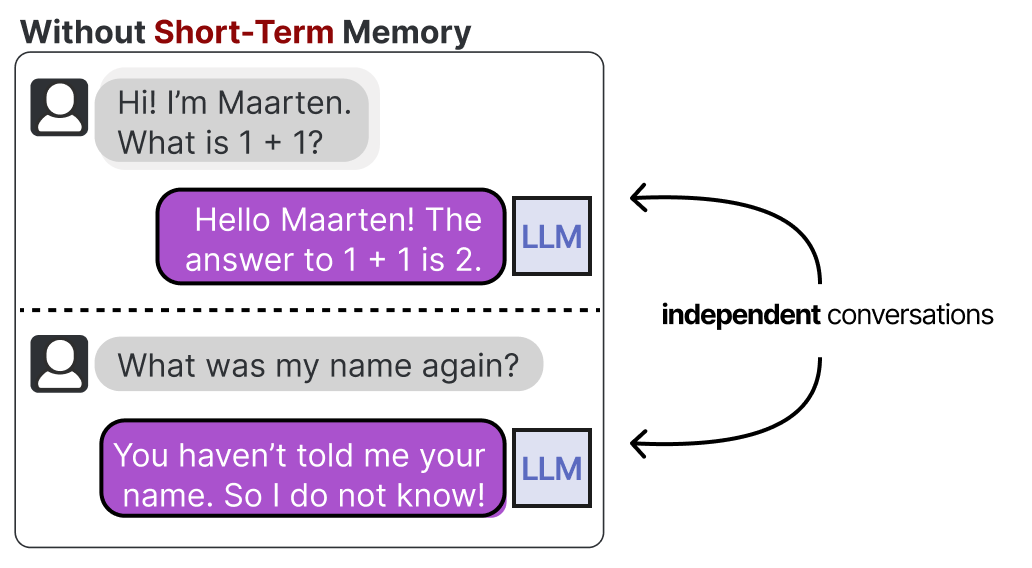
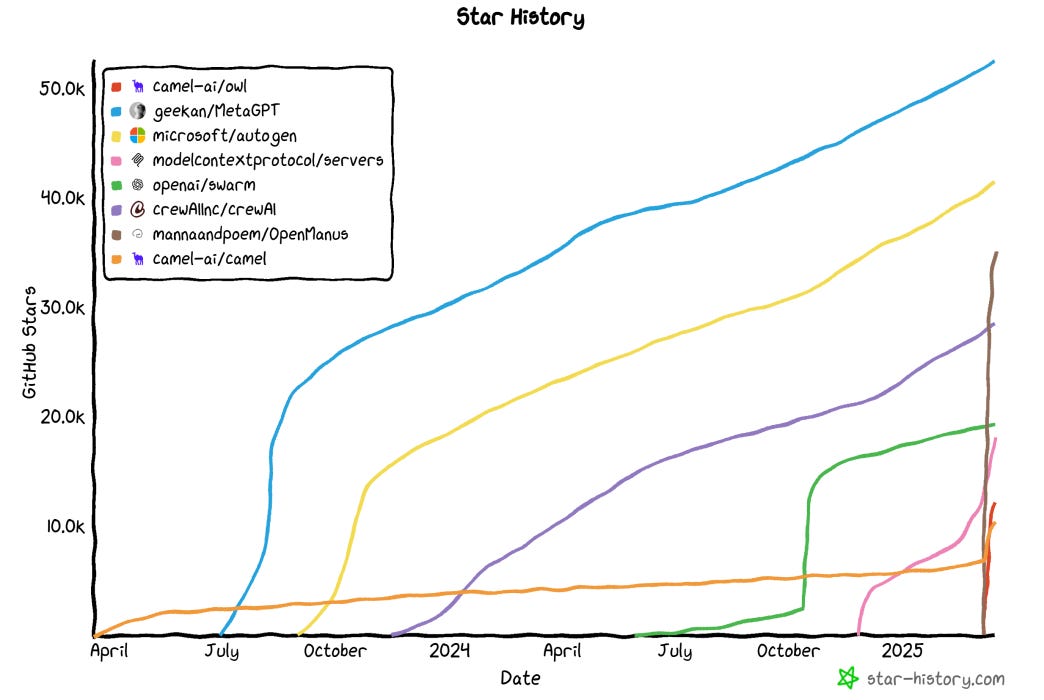
Why the model needs everything spelled out: it knows only what is in its context window right now. Figure: Alammar, J. and Grootendorst, M. (2024). Hands-On Large Language Models. O'Reilly Media.Role is powerful enough to build whole systems on: role-playing agents (CAMEL) solve tasks together. Figure: Alammar, J. and Grootendorst, M. (2024). Hands-On Large Language Models. O'Reilly Media.Roles in collaboration: a user-role agent and an assistant-role agent exchanging instructions and results. Figure: Alammar, J. and Grootendorst, M. (2024). Hands-On Large Language Models. O'Reilly Media.
2. The five parts, with a before and after
Here is a real request an office coordinator typed, and the version that works inside a workflow.
Before:
Summarise this email and tell me what to do.
After:
Role: You are an assistant to the facilities coordinator of a 200-person office.
Context: We receive maintenance requests by email. Urgent means a safety risk or a stopped service (lift, water, power, access).
Task: Read the email below and produce a triage note.
Constraints: Do not invent details that are not in the email. If the urgency is unclear, say "unclear" rather than guessing. Maximum 80 words.
Output format, exactly these labelled lines:
Requester:
Location:
Issue (one sentence):
Urgency (urgent / normal / unclear):
Suggested next action:
Email:
[paste email here]
Part
What it does
What goes wrong without it
Role
Sets vocabulary, tone and assumed knowledge
Generic, over-long answers
Context
Gives the facts and definitions the model cannot know
The model guesses your policies
Task
One verb, one deliverable
The model does three things badly
Constraints
Length, tone, forbidden actions, what to do when unsure
Invented details, wrong register
Output format
Makes the answer machine- and colleague-readable
Different shape every run; nothing downstream can use it
The line "If unclear, say unclear rather than guessing" is the single most valuable sentence in the prompt. It turns a confident wrong answer into a flag a person can act on. You will reuse it in every AI step you build.
3. Structured outputs and few-shot examples
An automation cannot read prose. It reads fields. Ask for labelled lines, a fixed set of categories, a markdown table, or a small set of key-value pairs, and say the allowed values out loud: "Category must be one of: billing, technical, sales, other."
Few-shot examples
Models copy patterns better than they follow descriptions. If your classification has edge cases, show two or three worked examples inside the prompt. This is called few-shot prompting.
Classify each message as billing, technical, sales or other.
Example 1: "My invoice shows the old price" -> billing
Example 2: "The portal logs me out every minute" -> technical
Example 3: "Do you offer a plan for schools?" -> sales
Example 4: "Thanks for the quick help yesterday" -> other
Now classify: "[message]"
Answer with the category only.
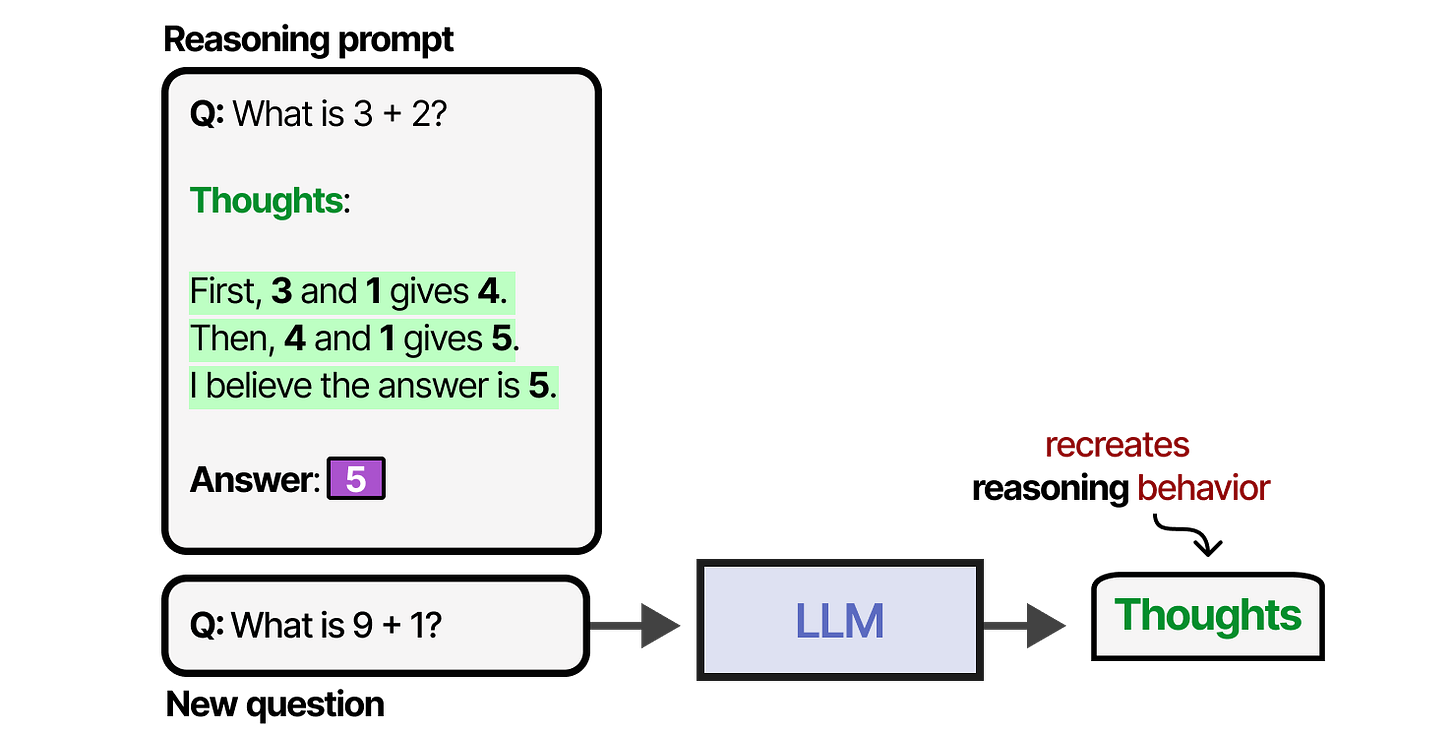
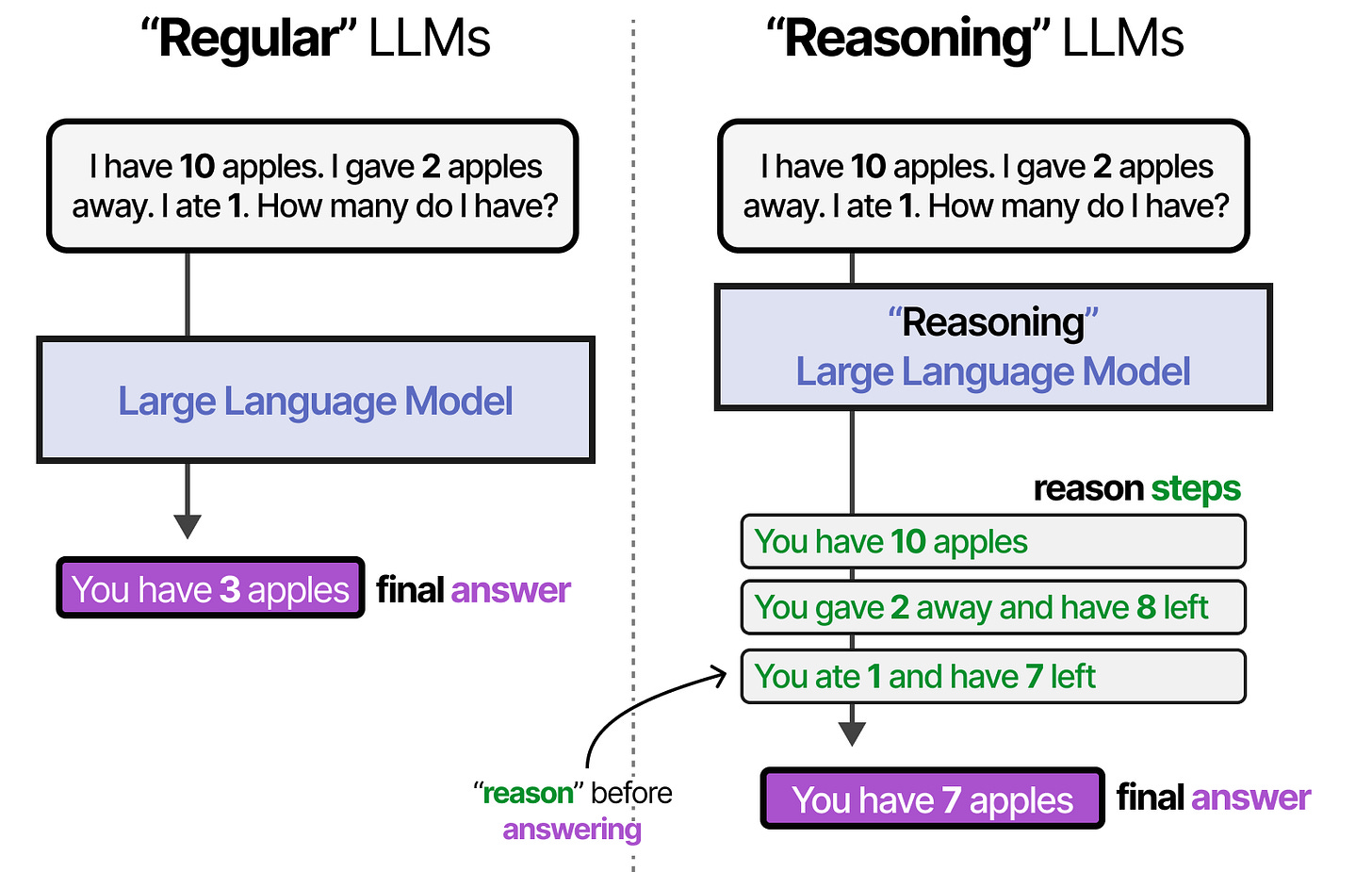
Examples with reasoning: when the examples show the reasoning, the model reasons before answering too. Figure: Alammar, J. and Grootendorst, M. (2024). Hands-On Large Language Models. O'Reilly Media.The one-line version: a single constraint asking the model to reason first. Figure: Alammar, J. and Grootendorst, M. (2024). Hands-On Large Language Models. O'Reilly Media.Reasoning first, conclusion last. The reasoning is also your audit trail. Figure: Alammar, J. and Grootendorst, M. (2024). Hands-On Large Language Models. O'Reilly Media.One verb, one deliverable: break a big request into sub-tasks, each with a clear output. Figure: Alammar, J. and Grootendorst, M. (2024). Hands-On Large Language Models. O'Reilly Media.
Iterating on a prompt
Collect ten real inputs, including two awkward ones.
Run the prompt on all ten and mark each answer right or wrong in a sheet.
Fix the prompt for the wrong ones by adding a constraint or an example. Never fix by adding "be more accurate".
Re-run all ten. Stop when you are at nine or ten out of ten twice in a row.
Try it on the live agent
The course bot @aicaravan_bot on Telegram doubles as a prompt test bench. Paste your template plus one input and it returns the output in the shape you asked for. Paste your classifier prompt followed by your ten test rows (input | expected) and it returns a table of input, expected, model answer and match, with a score. It runs your prompt as written and will not improve it unless you ask. Made-up inputs only. The bot answers only while the instructor has it switched on during a session.
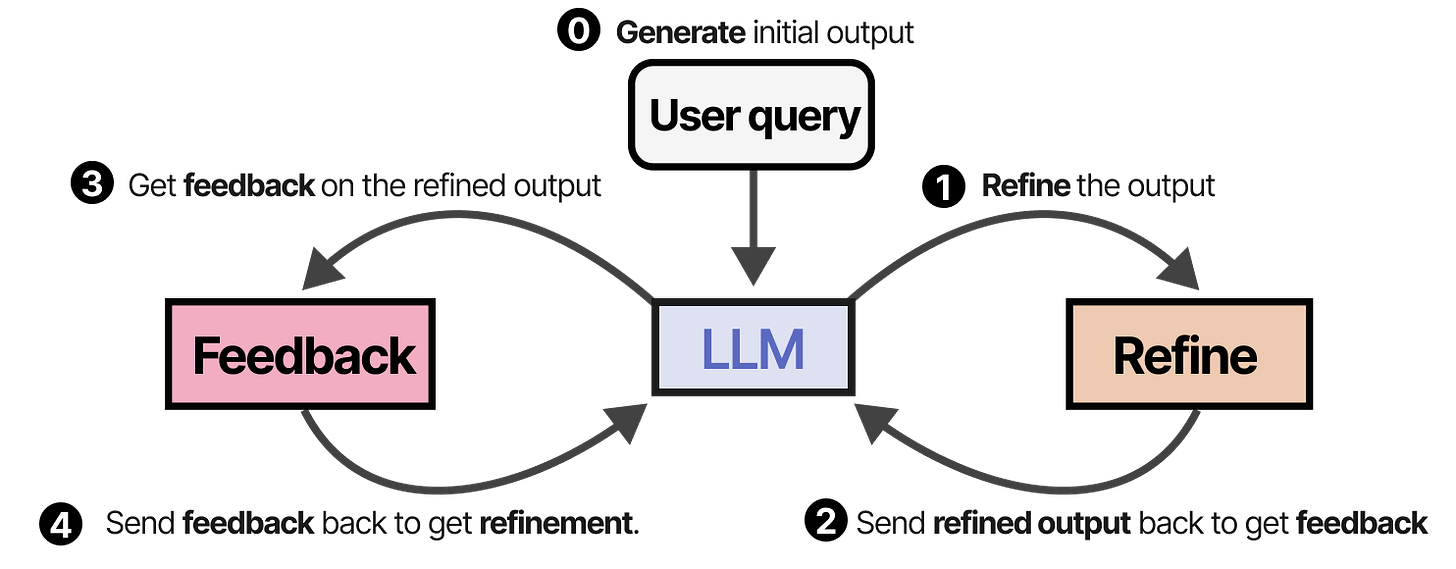
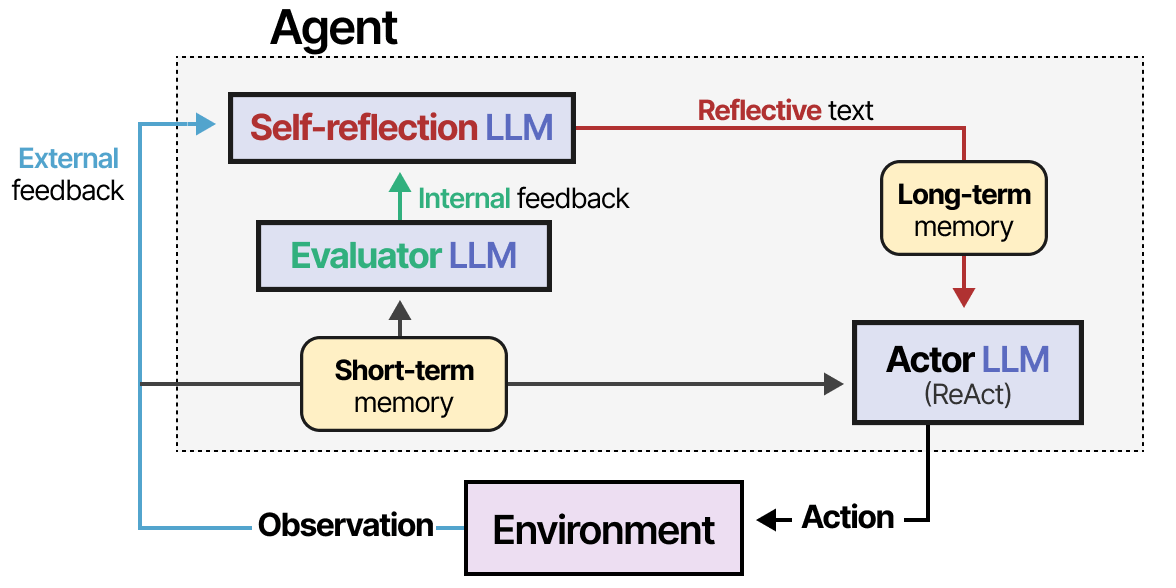
Models can refine their own output: draft, critique, revise, inside one prompt. Figure: Alammar, J. and Grootendorst, M. (2024). Hands-On Large Language Models. O'Reilly Media.Learning from mistakes (Reflexion): your ten-row test set is the human version of this loop. Figure: Alammar, J. and Grootendorst, M. (2024). Hands-On Large Language Models. O'Reilly Media.
That ten-row sheet is your first test set. Keep it. In Module 12 you will use it again every time you change the prompt or the model.
4. Assistants that know your documents
Every major assistant now lets you save a standing set of instructions together with uploaded files, so you do not repeat the context each time. The names differ; the idea is the same.
Product
Feature
What you can upload
Sharing
ChatGPT
Projects, custom GPTs
PDF, Word, spreadsheets, text
Custom GPTs can be shared with a team or link
Claude
Projects with project knowledge
PDF, Word, text, images
Shared within a Team or Enterprise workspace
Microsoft Copilot
Copilot agents, Copilot Notebooks
SharePoint and OneDrive files
Shared through Microsoft 365 permissions
Google Gemini
Gems
Google Drive files
Shared with Workspace users
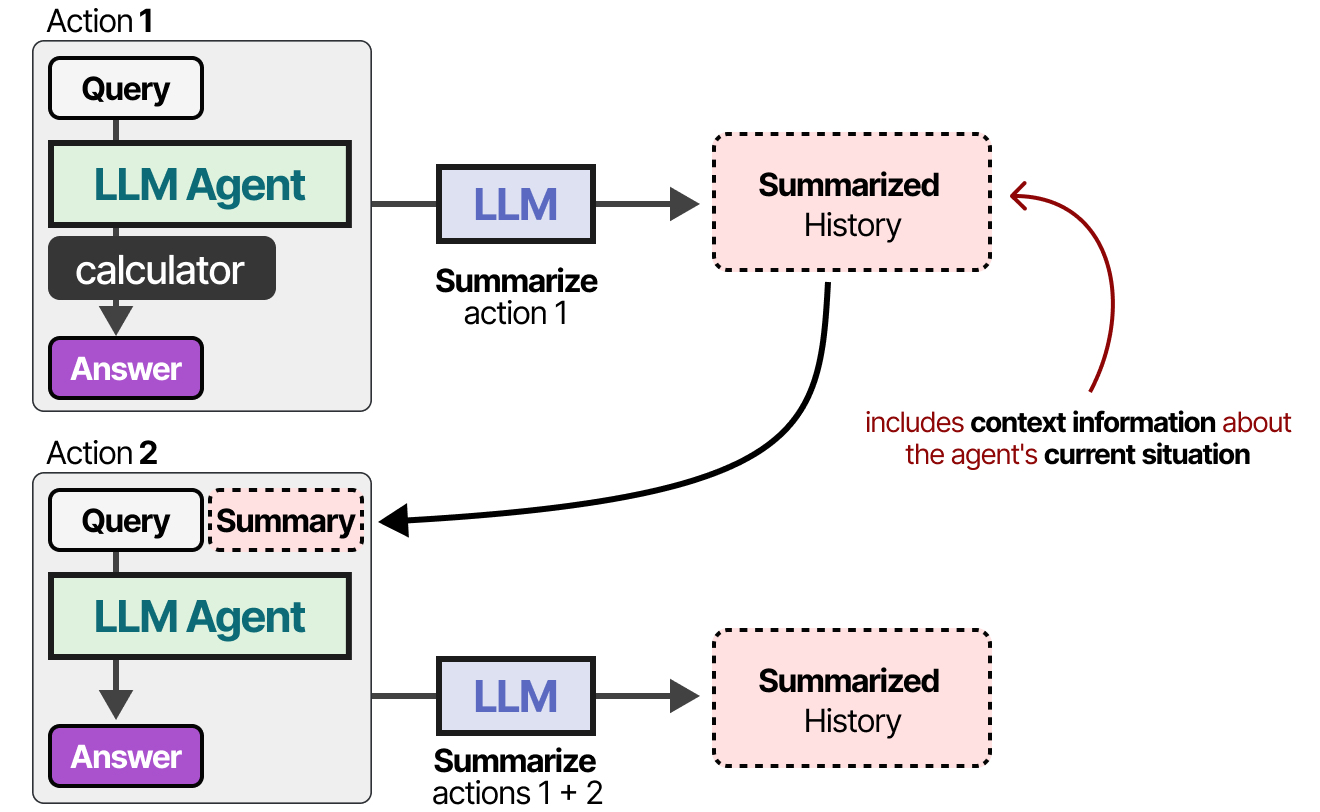
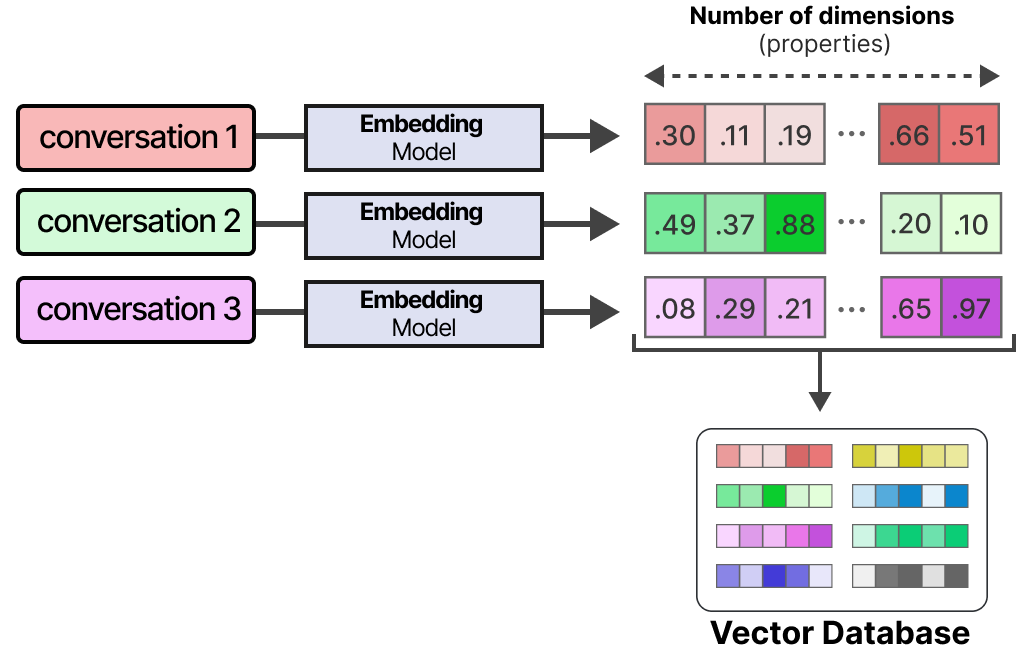
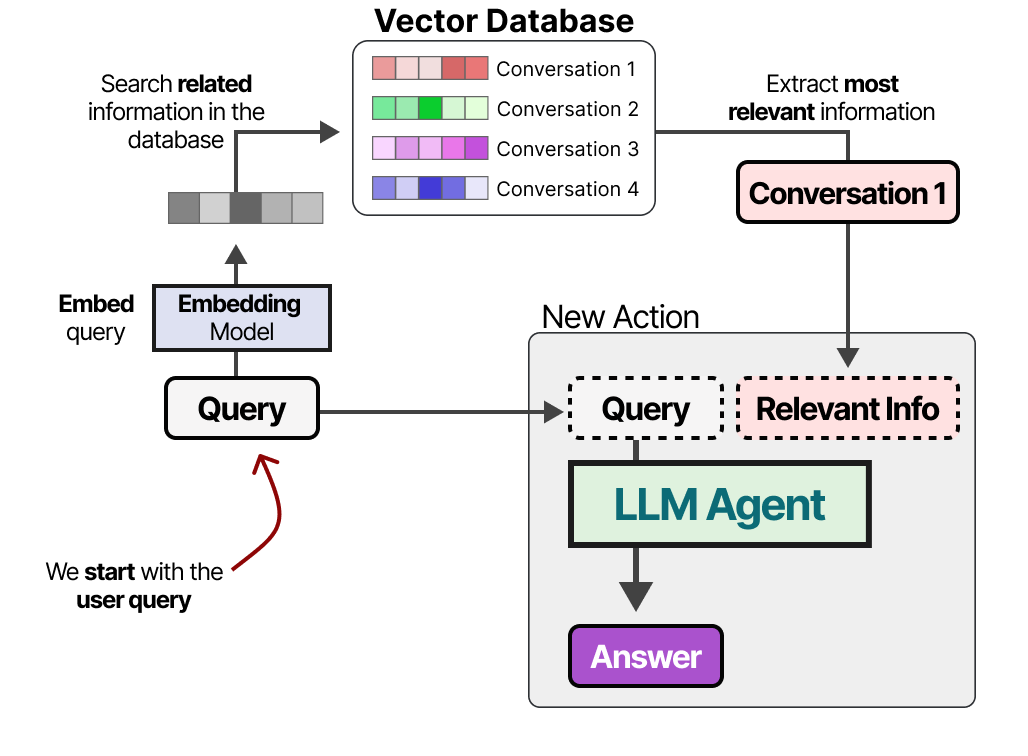
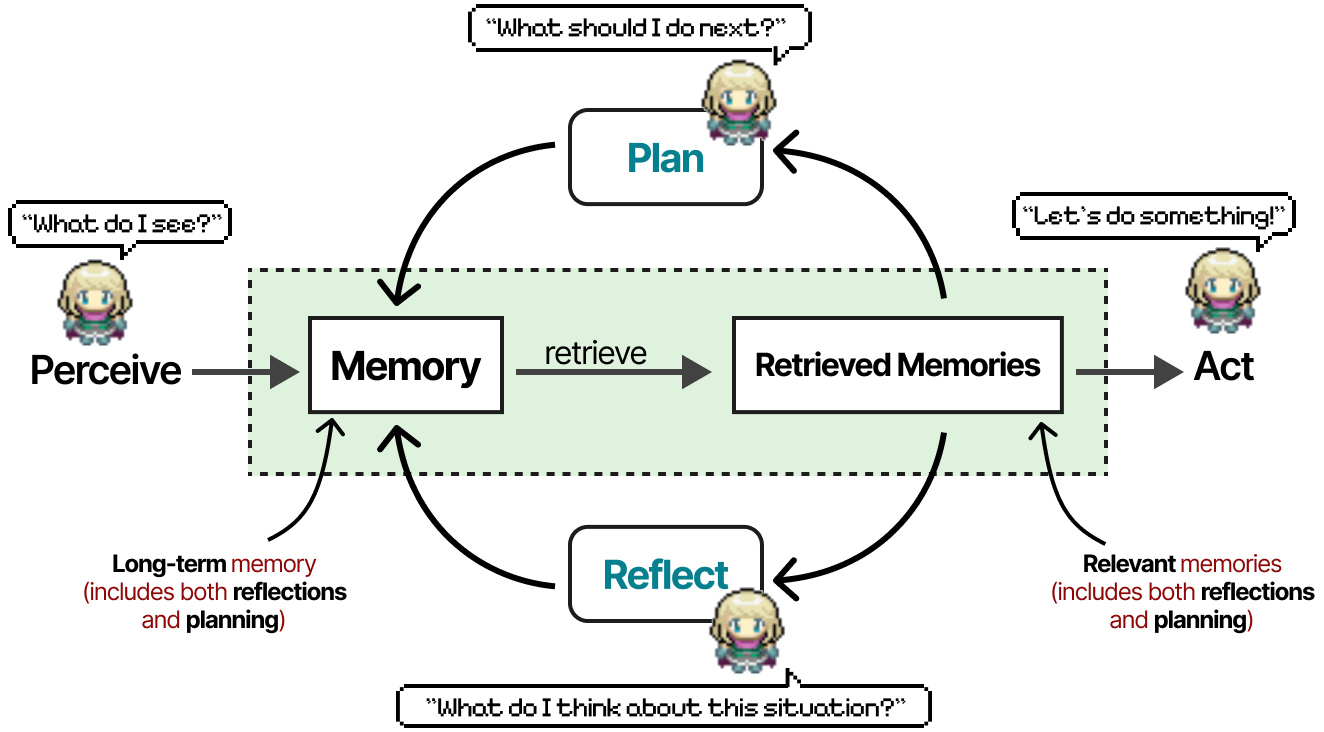
How documents become memory: long material is condensed so the essentials fit in the context window. Figure: Alammar, J. and Grootendorst, M. (2024). Hands-On Large Language Models. O'Reilly Media.Uploaded files are cut into chunks and indexed by meaning. Figure: Alammar, J. and Grootendorst, M. (2024). Hands-On Large Language Models. O'Reilly Media.Your question finds the closest chunks; they are placed in the context window; the model answers from them. Figure: Alammar, J. and Grootendorst, M. (2024). Hands-On Large Language Models. O'Reilly Media.Preview: memory at full scale (Generative Agents, 2023). Your department assistant is the first rung of this ladder. Figure: Alammar, J. and Grootendorst, M. (2024). Hands-On Large Language Models. O'Reilly Media.
A "department assistant" built this way is the simplest agent you will meet: a model, instructions, and memory in the form of your documents. It has no tools yet, so it can only answer, not act. That is a good thing while you learn what it gets wrong.
Data goes where the model goes
Before you upload a policy, a contract or anything with personal data, check your organisation's rules and the product's data terms. Consumer tiers may use uploads for training; business tiers usually do not. Module 11 covers this properly. Until then, use public or dummy documents in the labs.
5. Where prompts fail: hallucination and over-confidence
A language model produces the most plausible next words. When it lacks a fact it will often produce a plausible fact instead. This is hallucination, and it looks exactly like a correct answer. Three habits catch most of it:
What hallucination is: the model produces the most plausible next words; when it lacks a fact it produces a plausible fact instead. Figure: Alammar, J. and Grootendorst, M. (2024). Hands-On Large Language Models. O'Reilly Media.
Ground it. Give the model the source (paste the email, upload the policy) and instruct it to answer only from that source, quoting the line it used.
Give it an exit. "If the answer is not in the document, say so." A model told it may say "not found" will say it.
Check the checkable. Names, dates, numbers, order IDs and policy clauses can be verified in seconds. Verify them before they leave your desk.
Symptom
Likely cause
Fix
Cites a policy section that does not exist
No source provided, or source not searched
Upload the policy, require a quote
Different category for the same email on two runs
Categories not defined, no examples
List allowed values, add few-shot examples
Long, polite, says nothing
No task, no format
One verb, labelled output lines, word limit
Confident answer to an ambiguous request
No "unclear" option
Add the unsure clause and route unclear items to a person
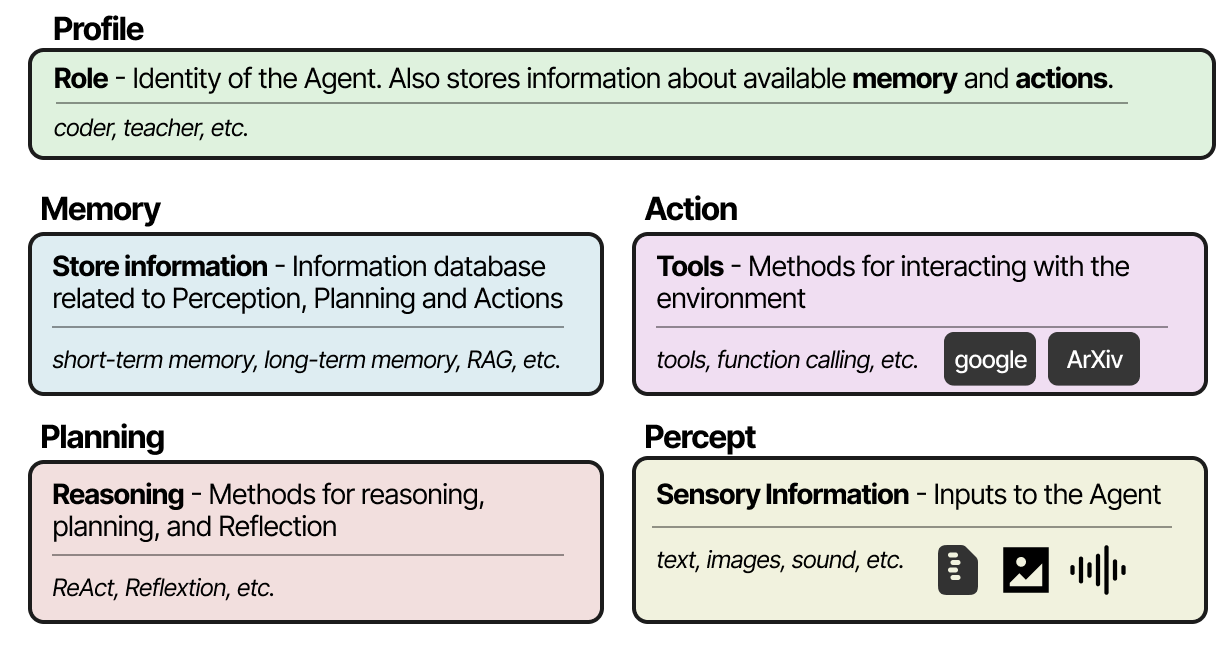
Tools change fast; the five parts and your ten-row test set travel with you. Figure: Alammar, J. and Grootendorst, M. (2024). Hands-On Large Language Models. O'Reilly Media.Preview of Module 9: many assistants, one system; each is model, tools, memory, instructions. Figure: Alammar, J. and Grootendorst, M. (2024). Hands-On Large Language Models. O'Reilly Media.
Practical lab
You will build two things: a five-template prompt library your team can reuse, and a department assistant that answers from uploaded documents. Use any of ChatGPT, Claude, Copilot or Gemini. For the documents, use public policies (for example a university's leave policy found online) or a made-up one; do not upload real internal documents yet.
1
Create the library document
Open a new document called M2-prompt-library. Make five headings: Triage an email, Summarise a meeting transcript, Draft a reply, Extract fields from a form, Classify a request.
2
Write each template with the five parts
Under each heading write role, context, task, constraints and output format. Use square-bracket placeholders such as [department] and [paste text] so a colleague can fill them in. Start from this skeleton:
Role: You are an assistant to the [role] in [department].
Context: [two or three facts and definitions the model must know]
Task: [one verb, one deliverable]
Constraints: Use only the information provided. If something is unclear or missing, write "unclear". Maximum [N] words. Tone: [plain / formal].
Output format (exactly these lines):
[Field 1]:
[Field 2]:
[Field 3]:
Input:
[paste text]
3
Add examples to the classifier
For the Classify a request template, list four allowed categories and write one example for each. Add a fifth, awkward example that should be classified as other.
4
Build the ten-row test set
In a spreadsheet, write ten realistic inputs for the classifier, with the category you expect in the next column. Run the prompt on each and record the model's answer in a third column. Count the matches.
5
Fix and re-run
For every mismatch, change the prompt (a constraint or an example, not a plea for accuracy) and run all ten again. Record the second score.
6
Create the department assistant
In your assistant, create a Project (or custom GPT, Gem, or Copilot agent). Paste this as its instructions and upload two public policy documents:
You are the [department] policy assistant. Answer questions only from the uploaded documents. For every answer, quote the sentence you relied on and name the document. If the answer is not in the documents, reply: "Not covered by the uploaded policies. Please ask [named person]." Keep answers under 120 words.
7
Test the assistant with a trap
Ask it three questions the documents answer, then two they do not (for example a benefit that is not mentioned). Note whether it admits "not covered" or invents an answer. Record the results at the bottom of your library document.
Then the same trap test on the course policy bot
Open @aicaravan_policy_bot on Telegram. It has the same assistant instructions and two fictional AI Caravan Ltd. policies built in (leave; travel and expenses), no tools and no memory. Ask the same kind of questions and compare with your own assistant.
Question
Expected
How many days of annual leave do I get?
Covered: 24 working days
How many unused days can I carry over?
Covered: 5, used before 31 March
What is the daily allowance inside Jordan?
Covered: 45 JOD
How many weeks of parental leave can I take?
Not covered
What is the mileage rate for using my own car?
Not covered
Deliverable
The M2-prompt-library document (five templates, test scores before and after, and the assistant's trap-test results) plus a screenshot of the assistant answering one question with a quotation.
Knowledge check
Pick one answer per question, then check your score. These mirror the style of the final exam.
Self-check
Answer in your own words first, then open the model answer.
1. Rewrite "Tell me what this contract says about cancellation" using all five parts.
Role: contracts assistant to the procurement team. Context: we need the notice period and any penalties. Task: extract the cancellation terms from the contract below. Constraints: only from the text, quote the clause, say unclear if absent, under 100 words. Output: Notice period / Penalty / Clause quoted / Confidence.
2. Why keep the ten-row test set after the prompt works?
Because prompts and models change. Re-running the same ten inputs after any change tells you immediately whether quality dropped. It becomes the evaluation set used in Module 12.
3. What is the difference between a project assistant and the agent you will build in Module 8?
The project assistant has a model, instructions and document memory but no tools; it can only answer. The Module 8 agent adds tools, so it can look things up and take actions.
Latest reading on prompting for work (2026)
Prompting best practices. Anthropic, official Claude platform documentation, updated with each model release. platform.claude.com. Be explicit about output format and constraints, give 2 to 5 worked examples, separate context, instructions and examples with clear labels.
Prompt engineering for business: the 2026 practical guide. Gend, 5 January 2026 (updated 30 March 2026). gend.co. A business template, R-TCC-COE: role, task, context, content, constraints, output, evaluation. Same skeleton as this module, plus an explicit evaluation rubric.
Production prompt engineering in 2026: structured outputs, prompt chaining and optimisation. AI Workflow Lab, Marcus Holloway, 13 February 2026 (updated 2 June 2026). aiworkflowlab.dev. Treat prompts as engineered, versioned, tested artefacts; constrain outputs to a fixed shape; split big tasks into chains.
Context Engineering: from prompts to corporate multi-agent architecture. V. Vishnyakova, arXiv 2603.09619, 10 March 2026. arxiv.org. Beyond the prompt, what matters is the whole information environment the model works in.
References
Alammar, J. and Grootendorst, M. (2024). Hands-On Large Language Models. O'Reilly Media. Source of the figures on this page.
Wei, J. et al. (2022). Chain-of-Thought Prompting Elicits Reasoning in Large Language Models. NeurIPS 2022.
Kojima, T. et al. (2022). Large Language Models are Zero-Shot Reasoners. NeurIPS 2022.
Madaan, A. et al. (2023). Self-Refine: Iterative Refinement with Self-Feedback. NeurIPS 2023.
Shinn, N. et al. (2023). Reflexion: Language Agents with Verbal Reinforcement Learning. NeurIPS 2023.
Li, G. et al. (2023). CAMEL: Communicative Agents for "Mind" Exploration of Large Language Model Society. NeurIPS 2023.
Park, J. S. et al. (2023). Generative Agents: Interactive Simulacra of Human Behavior. UIST 2023.
Lewis, P. et al. (2020). Retrieval-Augmented Generation for Knowledge-Intensive NLP Tasks. NeurIPS 2020.
OpenAI Help Center: Projects in ChatGPT; Creating a GPT. Anthropic Help Center: What are Projects? Microsoft Learn: Copilot agents and Notebooks. Google: Gems in Gemini.
IEEE CS Region 8 AI Caravan (2026). AI Administrator Track Curriculum. aicaravan.org.
Summary
Key takeaways
A prompt is a work instruction: role, context, task, constraints, output format. Missing parts cause most failures.
Ask for labelled fields and allowed values, and show examples; that is what makes an answer usable by an automation.
Improve prompts with a ten-row test set, one constraint or example at a time, and keep the set for later.
Projects and custom assistants give the model your documents as memory; check data rules before uploading anything real.
Ground the model, give it an exit, and verify the checkable facts.